For months, we've heard the same challenge from merchants running pre-order campaigns: customers hesitate to pay full price upfront for products that won't ship for weeks or months. High-ticket items sit in carts. Conversion rates suffer. Pre-order potential goes unrealized.
Today, we're excited to announce K1 PreOrder V2—a complete transformation of how pre-order payments work. With V2, you can now offer deposits, split payments, or full payment options within a single pre-order rule. Give your customers flexibility, boost conversions, and take control of your cash flow like never before.
Beyond flexible payments, V2 brings enhanced widget customization, native App Block integration, a redesigned homepage experience, and significant performance improvements for high-volume stores.
Table of Contents
- What's New in K1 PreOrder V2
- Partial Payments: The Game-Changer for High-Ticket Pre-Orders
- Enhanced Widget Customization & App Block Integration
- Improved Homepage Experience
- Performance Improvements for High-Volume Stores
- Getting Started with V2
What's New in K1 PreOrder V2
Version 2 represents a complete rebuild of K1 PreOrder, leveraging Shopify's Deferred Purchase Options API to unlock payment flexibility that wasn't possible before. At its core, V2 introduces a new payment plan architecture that allows you to mix and match payment options—giving merchants unprecedented control over how customers pay for pre-orders.
Here's what V2 brings:
- Partial payment support: Offer deposits (percentage or fixed amount) alongside full payment options
- Customizable storefront widget: Control appearance, messaging, and payment option display
- Native App Block integration: Add pre-order widgets to product pages without touching code
- Redesigned homepage UI: Cleaner setup guidance and faster navigation
- Reorganized settings: Payment-related options now grouped logically in one place
- Performance enhancements: Advanced caching and database optimization for large catalogs
Let's dive into what these changes mean for your store.
Partial Payments: The Game-Changer for High-Ticket Pre-Orders
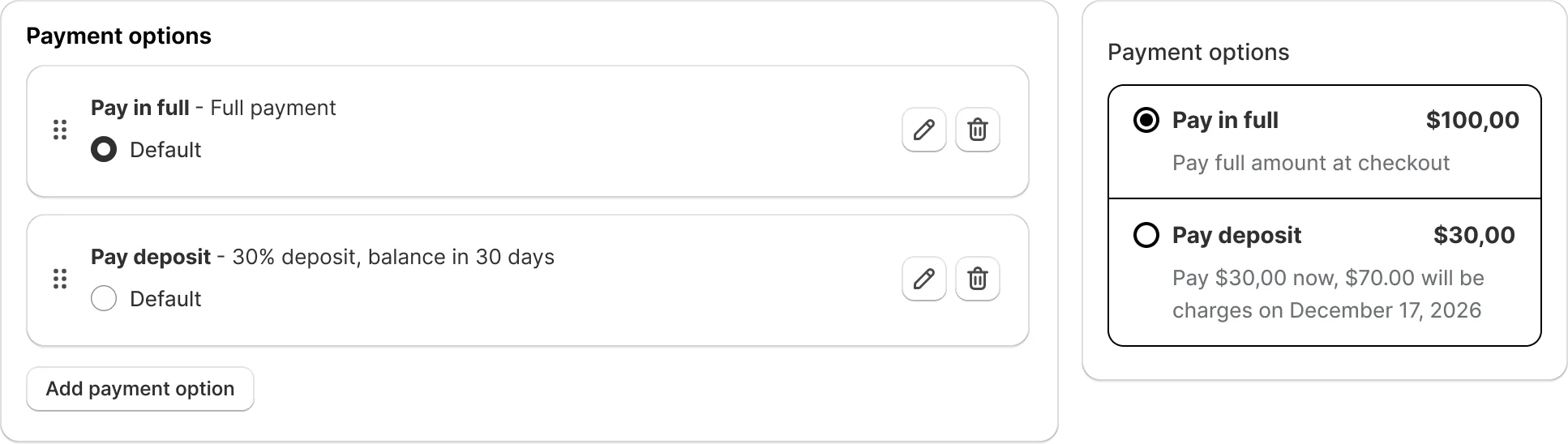
The headline feature in V2 is partial payment support—and it fundamentally changes how you can run pre-order campaigns.
The Problem with Full Upfront Payment
When you require customers to pay the full product price upfront for a pre-order that won't ship for weeks, you create a significant barrier to entry. This is especially painful for high-ticket items: furniture, custom products, seasonal inventory, or limited-edition launches. Customers want the product, but the combination of high price and long wait time triggers hesitation.
The V2 Solution: Payment Flexibility
With V2, you can create multiple payment options within a single pre-order rule. Offer customers a choice:
- Pay in full now (traditional pre-order)
- Pay a deposit (percentage-based, like 30%)
- Pay a fixed amount (like $50 to secure the order)
Customers choose the option that works best for them. You secure the commitment, reduce abandonment risk, and improve cash flow.
Key Capabilities
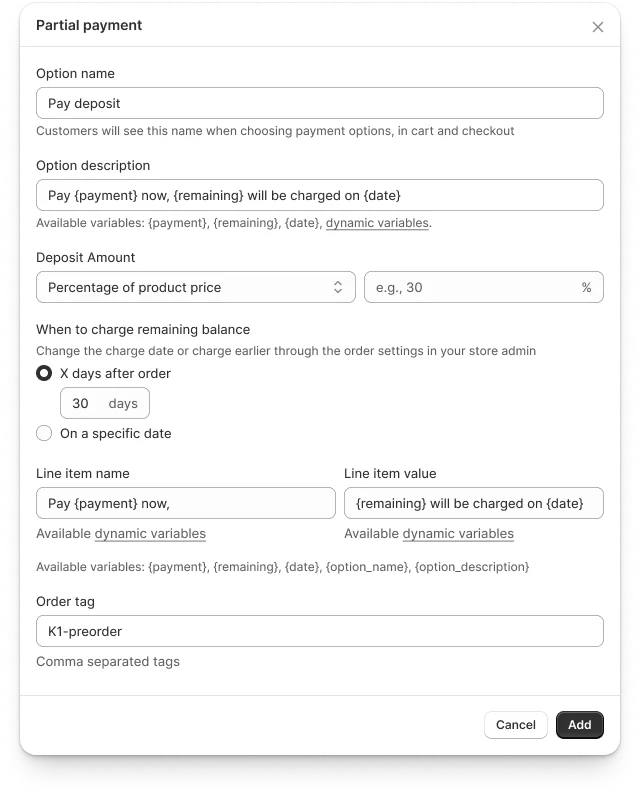
Deposit configuration: Set deposits as a percentage of product price (e.g., 30% down) or a fixed dollar amount (e.g., $50 deposit). Mix and match within the same rule.
Multiple payment options: Create unlimited payment options in a single pre-order rule. Offer full payment, 30% deposit, 50% deposit, or any combination that fits your business model.
Custom messaging: Use dynamic variables to show customers exactly what they'll pay today and when the balance is due. Transparency builds confidence.
Automatic balance collection: Shopify handles balance payments according to your schedule—whether that's before shipping, on a specific date, or based on fulfillment timing.
Order tagging by payment type: Automatically tag orders based on which payment option the customer selected (e.g., "Deposit Order" vs. "Full Payment"). Perfect for workflow segmentation.
Merchant Benefits
Lower barrier to entry: Deposits reduce the initial financial commitment, especially for expensive items. Lower friction means higher conversion rates.
Improved cash flow management: Collect deposits immediately to fund production or inventory procurement. Balance payments arrive on your schedule.
Reduced cancellation risk: Customers who pay deposits are more committed than customers who simply add items to a wishlist. Split payment reduces buyer's remorse.
Competitive positioning: Compete with marketplaces offering "pay later" and installment options. Give customers payment flexibility without third-party fees.
Customer confidence: Deposits lower perceived risk for customers trying new products or pre-ordering from your store for the first time.
Enhanced Widget Customization & App Block Integration
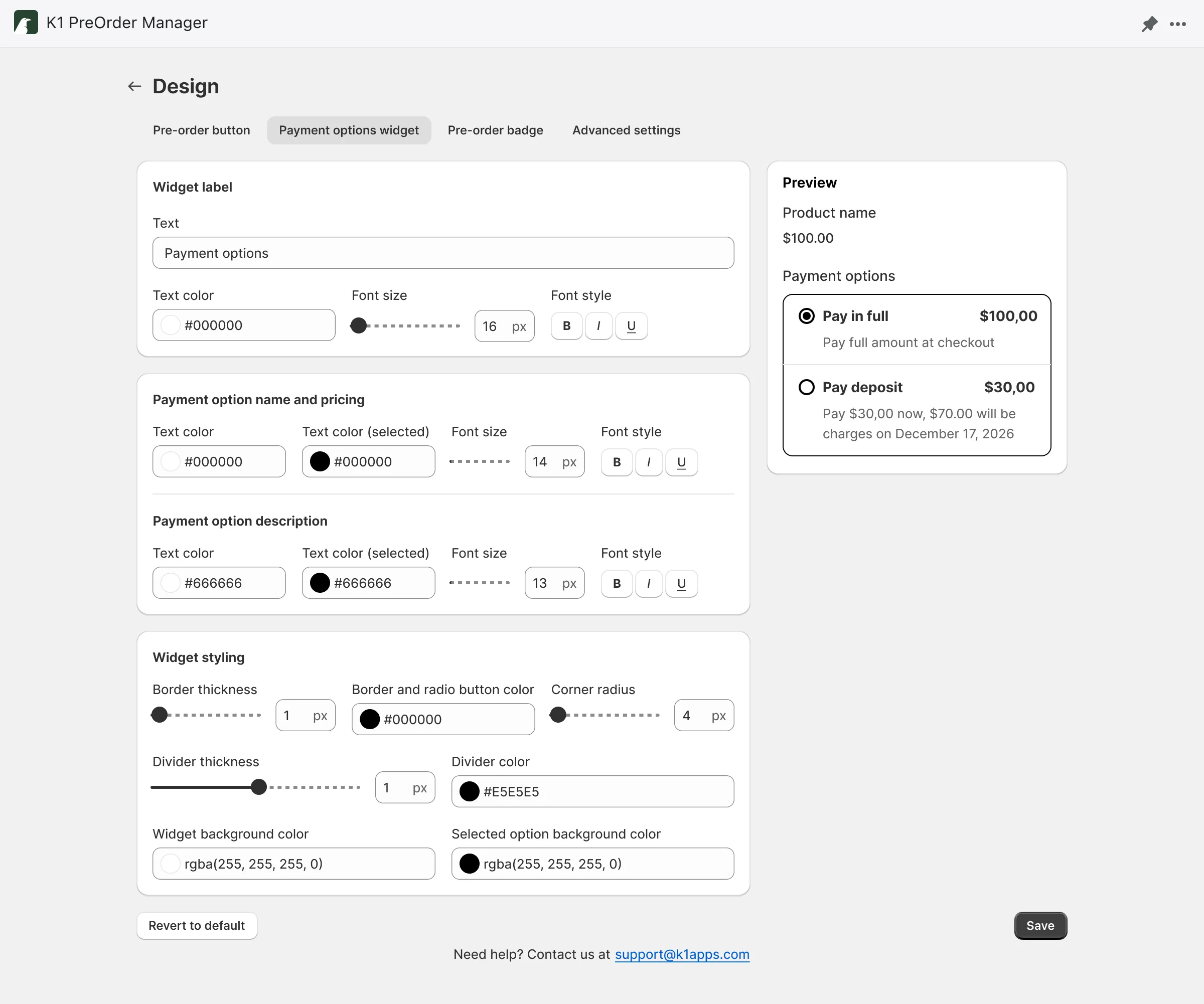
Payment flexibility is only powerful if customers understand their options. V2 introduces full widget customization and native App Block integration to ensure your payment options are displayed beautifully and clearly.
Widget Customization
Control every aspect of how payment options appear on product pages:
- Display order: Rearrange payment options to highlight your preferred choice
- Default selection: Set which payment option is pre-selected when customers view the page
- Custom labels: Name each payment option to communicate value ("Secure with Deposit", "Pay in Full—Save 5%")
- Dynamic messaging: Use variables to show exact amounts and dates per product (e.g., "Pay $150 today, $350 on March 15")
- Visibility control: Show or hide specific payment options based on your campaign strategy
App Block Integration
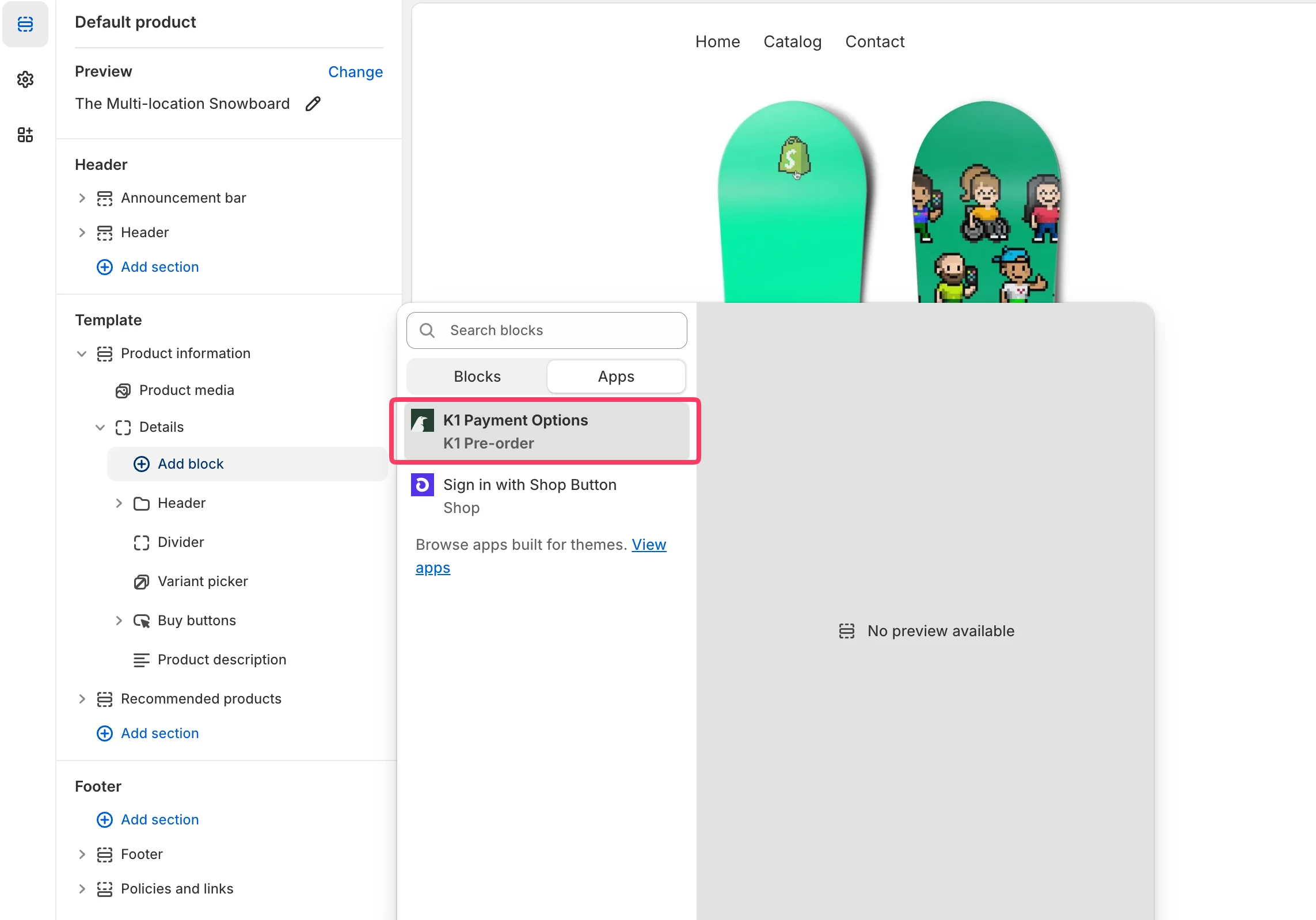
V2 introduces native Shopify App Block support, making it easier than ever to add pre-order widgets to your theme:
- No code required: Add the pre-order widget directly from the theme editor
- Drag-and-drop placement: Position the widget exactly where you want it on product pages
- Universal theme compatibility: Works with any Shopify theme that supports App Blocks (OS 2.0 and newer)
For merchants who prefer embedded widgets, that option remains fully supported.
Improved Homepage Experience
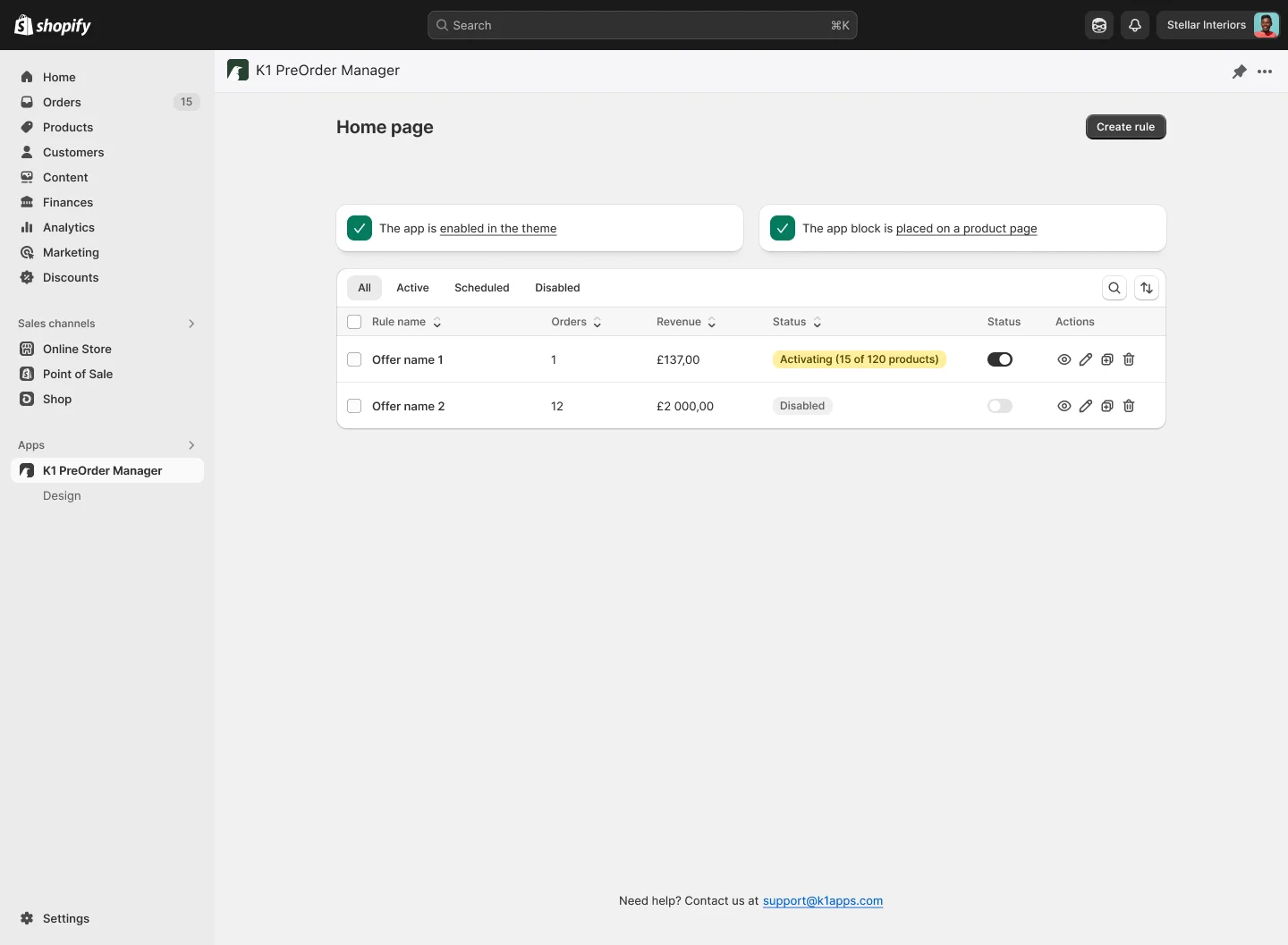
V2 brings a cleaner, more intuitive admin experience designed to help you configure pre-orders faster and manage payment options more effectively.
The K1 PreOrder homepage has been redesigned with better navigation and setup guidance:
- Clearer onboarding flow for new users setting up their first pre-order rule
- Faster access to payment option configurations
- Improved rule management for stores with multiple pre-order campaigns
- Reorganized settings: Payment-related options now grouped logically, with Order Tag and Inline Item configurations at the payment option level for maximum flexibility
Performance Improvements for High-Volume Stores
Behind the scenes, V2 includes significant performance enhancements designed to handle large product catalogs and high-traffic periods effortlessly.
Why Performance Matters
Stores with thousands of products or complex pre-order setups need speed and reliability. Slow-loading widgets hurt conversion rates. Laggy admin interfaces frustrate teams. V2 addresses both.
V2 Performance Enhancements
Advanced caching layer: Extra caching mechanisms ensure faster page loads and widget rendering, even for stores with large catalogs.
Database optimization: Query improvements and indexing strategies reduce load times when managing hundreds or thousands of pre-order rules.
High-load handling: Better performance under peak traffic conditions—like product launches or flash sales—when your store needs reliability most.
Merchant Impact
- Faster storefront experience: Widgets load quickly, keeping customers engaged
- Smoother admin interface: Manage large rule sets without slowdowns
- Reliable checkout flows: Handle traffic spikes during high-demand pre-order launches
Getting Started with V2
Ready to explore the new payment flexibility and features in V2?
For new merchants: Install K1 PreOrder from the Shopify App Store and set up your first partial payment rule in minutes. Choose your deposit percentage, customize your messaging, and start converting more high-ticket pre-orders.
For existing users: Open your K1 PreOrder dashboard and explore the new payment options. Edit existing rules to add deposit options, or create new rules to test split payments on high-value products.
Need help? Our support team is ready to assist you via live chat or email at support@k1apps.com.