Changelog
Explore all K1 PreOrder features
Version 2.37 –
🚀 New Features
Editable Order Summary Labels – Match every totals row in customer emails to your language and brand
- Customize all seven labels in the Order summary email block, including Subtotal, Discounts, Shipping, Taxes, Total, Deposit, and Balance. Empty fields keep the existing English defaults, and the selected wording is used consistently in the editor, HTML email, and plain-text version.
🛠 Improvements
Large-Catalog Rule Reliability – Keep active rules working while K1 repairs and synchronizes large catalogs
- K1 processes large rule updates in safe batches and preserves an already-active rule if a refresh fails, instead of removing its existing pre-order setup. Collection-membership repairs update only the missing products without locking the complete rule in Activating, and integrity checks now cover catalogs with up to approximately 100,000 variants.
Reliable Cleanup After Collection Changes – Complete interrupted rule cleanup without affecting valid coverage
- When a collection is deleted, K1 releases its products in manageable batches while preserving products still covered elsewhere. Interrupted cleanup and stranded rule operations can be detected and completed automatically.
🐞 Fixes
Cart Recovery Without Missing Items – Prevent interrupted repairs from silently removing cart lines
- Fixed a Smart Cart Allocation recovery scenario where movement of an unrelated cart line could stop a repair after regular quantities had already been reduced, causing affected items to disappear. K1 now verifies the lines required by the repair instead of rejecting it because an unrelated part of the cart changed.
Version 2.36 –
🚀 New Features
Mixed Cart Warning & Control – Warn shoppers or prevent pre-order and in-stock items from being combined
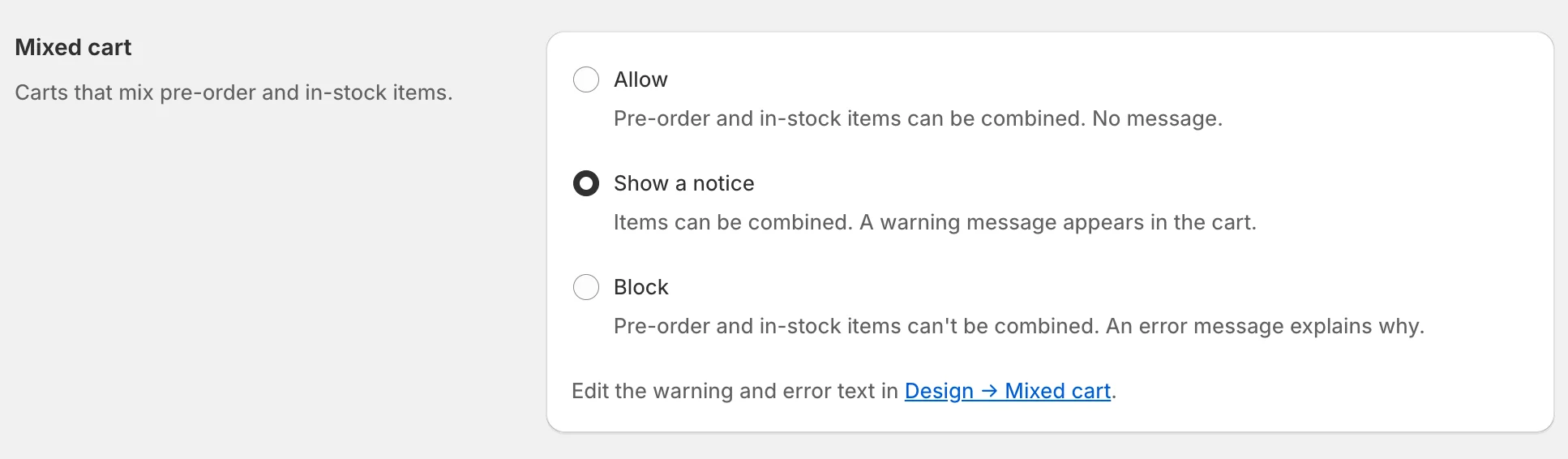
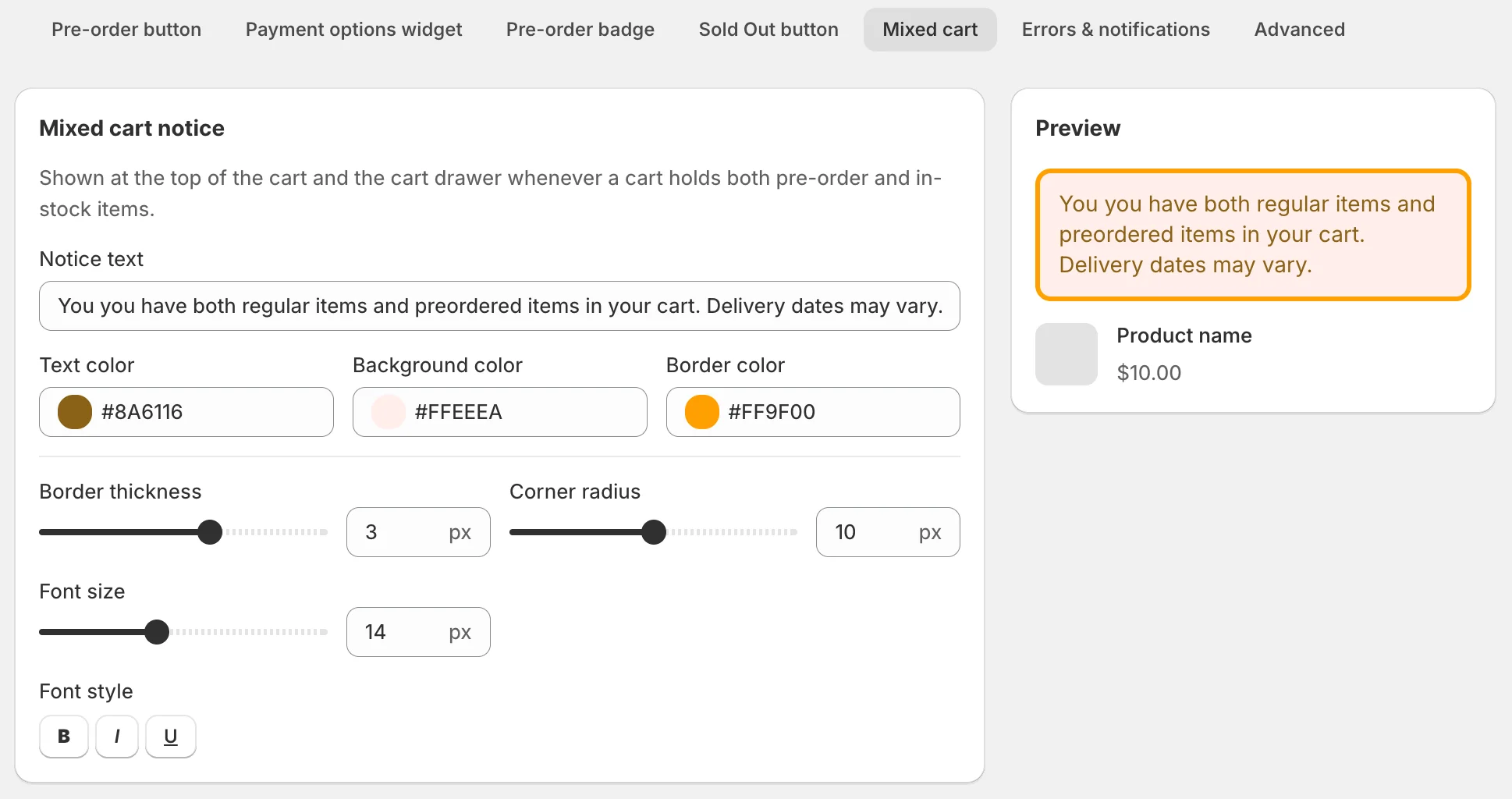
- A new shop-wide Mixed cart setting lets you choose what happens when a customer combines pre-order and in-stock products: Allow the cart as usual, Show a notice while still allowing checkout, or Block the combination entirely.
- In Show a notice mode, your custom message appears in the cart page and cart drawer. Edit the text and style it from the new Design → Mixed cart tab, then translate it for each storefront language.
- In Block mode, K1 prevents the action that would create a mixed cart and blocks checkout through standard checkout and accelerated methods such as Shop Pay, PayPal, Apple Pay, and Google Pay. The buyer sees your customizable explanation of what needs to change.
- Blocking mixed carts also turns Mixed-cart shipping off, because separate-shipment pricing is no longer needed when the two item types cannot be ordered together. Your configured shipping rates and zones are preserved for reuse if you switch back to Allow or Show a notice.
- Smart Cart Allocation can create a mixed cart by design, so Block is unavailable while allocation is enabled. Show a notice remains compatible.
- The default is Allow, so existing stores keep their current cart and checkout behavior until they choose another mode.
Version 2.35 –
🚀 New Features
Estimated Shipping Date – Show customers when their pre-order is expected to ship
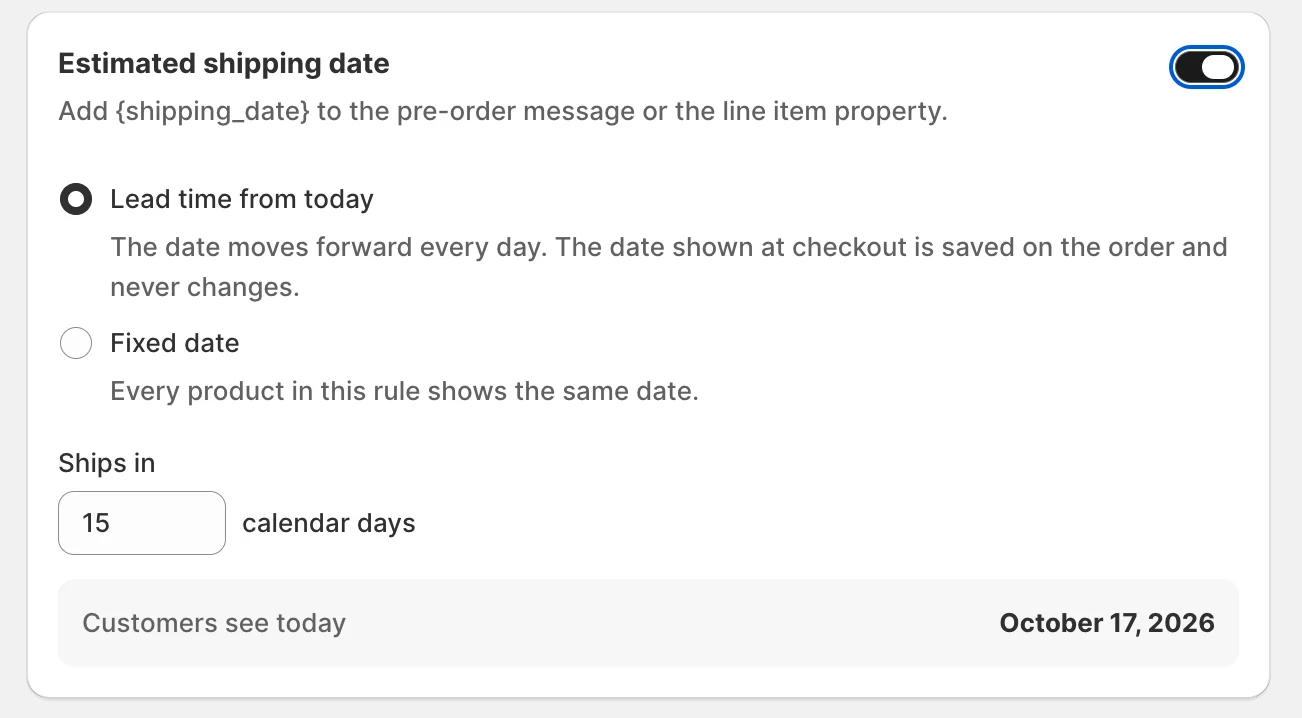
- Add an Estimated shipping date to any rule using either a fixed date or a lead time of 1–365 calendar days. Use {shipping_date} in the pre-order message, payment-option text, and cart line-item property, with the value calculated from your store’s calendar and preserved on the order.
- The rule preview resolves the date before publishing. New fixed dates cannot be set in the past, while an existing campaign whose date has passed can still be edited or disabled without being blocked.
🛠 Improvements
Reliable Rule Activation for Large Catalogs – Complete campaigns without Shopify timeouts
- Large rules can finish attaching pre-order options across thousands of variants instead of failing partway through and rolling back the entire campaign. Processing adapts to Shopify’s response time while keeping smaller rules unchanged.
- If a rule’s Shopify selling-plan group is missing, K1 recreates it and restores the payment-option mapping. A terminal activation failure also exits the Activating state cleanly instead of leaving the rule stuck.
Localized Dates and Japanese Customer Accounts – Keep merchant previews and buyer information consistent
- Dates in storefront messages and admin payment-option previews follow the store’s locale and timezone, preventing the displayed calendar day from shifting between K1 and Shopify.
- The My pre-orders Customer Account experience is available in Japanese when the buyer’s locale resolves to Japanese.
More Reliable Cart & Checkout Protection – Keep validation active on large and complex storefronts
- Cart and checkout protection continues enforcing inventory and pre-order limits in very large carts, instead of silently stopping when the cart contains many lines.
- K1 can restore protection after a valid storefront widget render and automatically work around an app-proxy path already used by another Shopify app.
🐞 Fixes
Historical Pre-Order Status – Rule edits no longer rewrite existing orders
- Fixed an issue where editing, renaming, or removing a rule’s payment option could make an existing deposit pre-order appear as a full-payment order and change its status. Each pre-order keeps the payment type recorded when the order was created.
POS and Draft-Order Recognition – In-stock retail sales no longer become pre-orders
- For stores enrolled after the Sep 29 cohort cutover, K1 evaluates the rule mode and inventory at the assigned fulfillment location before treating an unmarked POS or completed draft-order line as a pre-order. This prevents ordinary in-stock sales from affecting pre-order records, limits, emails, and plan usage, while actual offline-channel pre-order revenue is counted correctly.
- Existing merchants and online-storefront order recognition remain unchanged.
Version 2.34 –
🚀 New Features
Shopify Markets Targeting – Run pre-orders only in the markets you choose
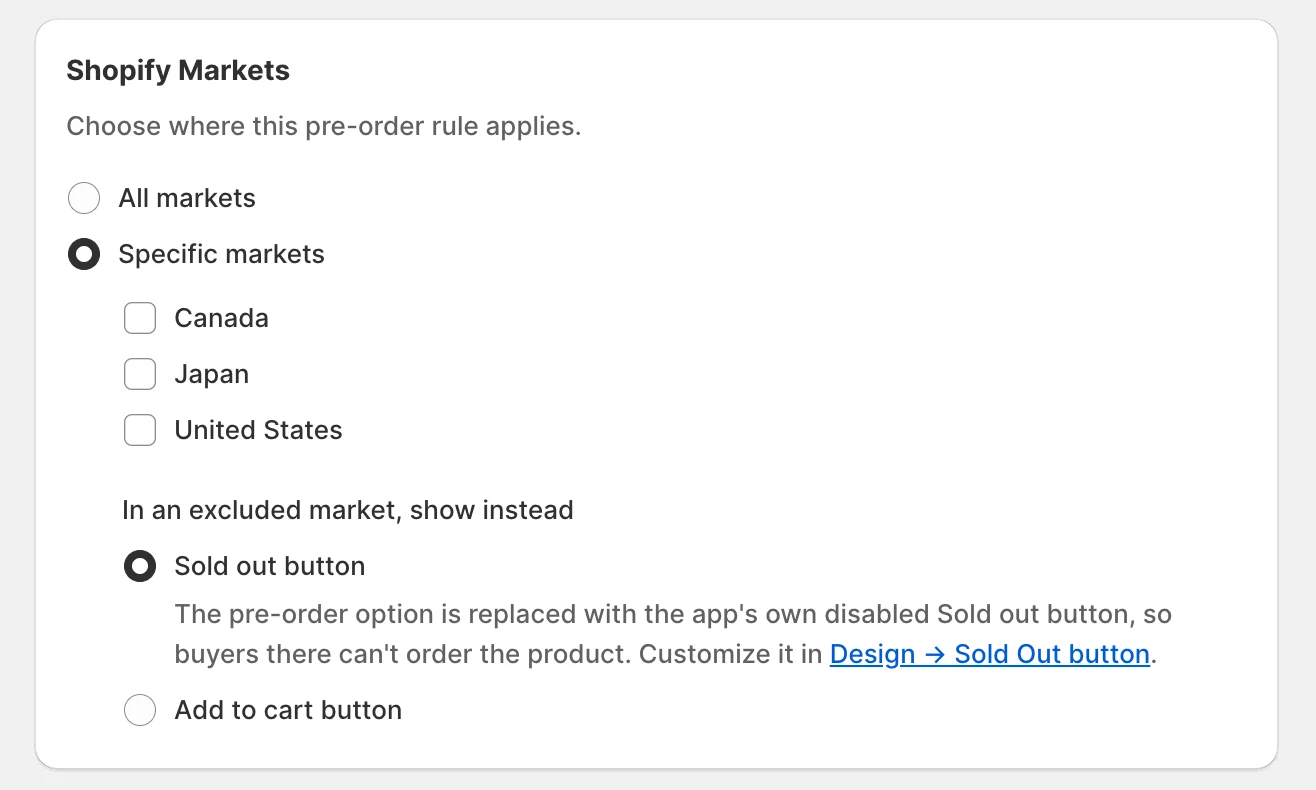
- Set each pre-order rule to All markets or select specific Shopify Markets, so you can launch pre-orders by region without duplicating rules.
- For buyers in excluded markets, choose whether K1 shows your Sold Out button or restores the theme’s regular Add to cart experience. Shopify determines each buyer’s market automatically, including regional and “rest of world” markets.
- Available on Growth and higher plans, plus the eligible grandfathered plan. You may need to reopen the app once to approve access to Shopify Markets.
🛠 Improvements
Free Competitor Migration – Move your existing pre-order setup with help from our team
- New and reinstalled stores can request a free migration of their rules, settings, and outstanding payments directly from the K1 Home or Settings page.
- The request opens a prepared conversation with the K1 team, so you do not need to rebuild the setup manually.
🐞 Fixes
Scheduled Rule Activation – Future campaigns start when planned
- Fixed an issue where a newly created rule with a future start date could activate immediately and lose its scheduled date. The rule now remains Scheduled and activates automatically at the selected time; manually choosing Activate still starts it immediately.
Cart Recovery After Inventory Changes – Shoppers are no longer trapped in blocked carts
- Fixed carts containing regular items that became pre-order-only after being added. K1 converts eligible stale lines to pre-order and can repair several affected products together, preventing persistent Only 0 available errors that previously blocked quantity changes, removal, and checkout.
Sold-Out Checkout Protection – “Buy it now” no longer bypasses unavailable products
- When a pre-order limit is reached or the buyer’s market is excluded with the Sold Out behavior, K1 also hides Buy it now and other accelerated-checkout buttons. They return automatically when the selected variant becomes available.
Version 2.33 –
🛠 Improvements
Customer Account Cancellation Control – Decide whether customers can cancel pre-orders themselves
- A new Hide the "Cancel pre-order" button in Customer Accounts setting under Settings → Pre-order cancellation & refunds lets you disable buyer-initiated cancellations without changing your refund policy.
- The button remains visible by default, so existing stores keep their current behavior until the setting is enabled.
Version 2.32 –
🚀 New Features
Mixed-Cart Shipping Costs – Stop losing money when pre-order and in-stock items need separate deliveries
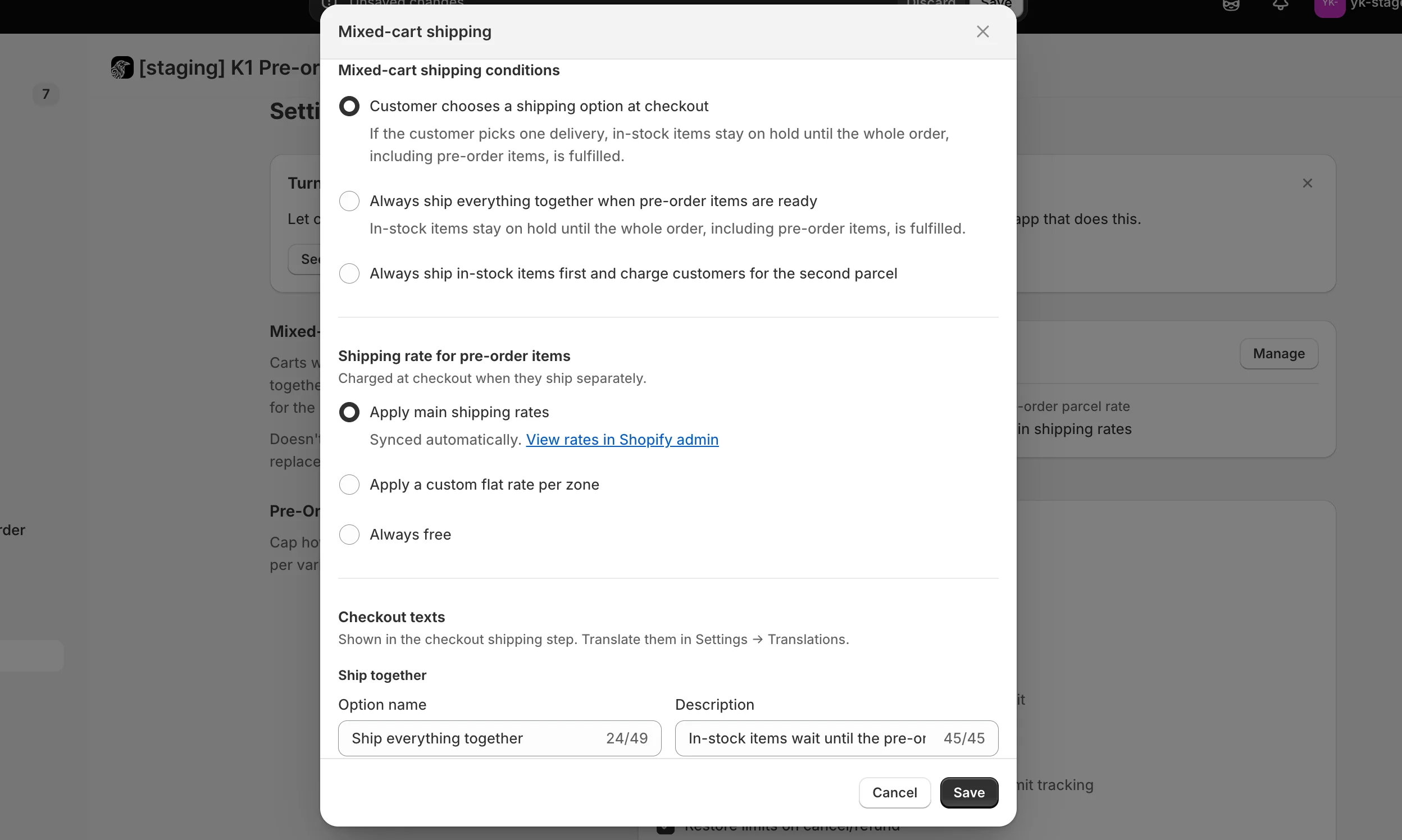
- A mixed cart can require two shipments even when Shopify collects only one shipping fee, leaving you to cover the pre-order parcel yourself. The new Mixed-cart shipping setting lets you control what customers pay when an order contains both in-stock and pre-order items.
- Choose how to price the pre-order shipment: Apply main shipping rates, Apply a custom flat rate per zone, or make the pre-order shipment free.
- At checkout, customers can choose to wait and receive everything together or have available items shipped separately. When they choose separate delivery, Shopify collects the additional shipping cost during checkout.
- For one-delivery orders, K1 holds the in-stock fulfillment and releases it automatically after the pre-order fulfillment is completed. Available on Growth and higher plans, plus eligible legacy paid plans.
Version 2.31 –
🛠 Improvements
Always-Current Pre-Order Details in the Cart – Keep delivery dates and custom messages accurate through checkout
- For stores that do not use Smart Cart Allocation, K1 refreshes each pre-order cart line from the current payment-option message and product metafield when the cart opens and when the customer selects Checkout. Changes made after an item was added to the cart can therefore carry through to checkout and the order.
- Each line is refreshed against its own selected payment option, existing K1 and cart properties are preserved, and a previously resolved value is not overwritten when a dynamic metafield is unavailable.
🐞 Fixes
Variant Selection on Custom Themes – Keep payment options and the pre-order button in sync
- Improved compatibility with themes that update the selected variant programmatically without triggering the standard variant-field event. K1 can detect the delayed variant selection and render the correct Full payment or Deposit options, pre-order button, and cart properties for the selected variant.
Version 2.30 –
🚀 New Features
Pre-Order Discounts – Reward customers for pre-ordering with a discount on any payment option
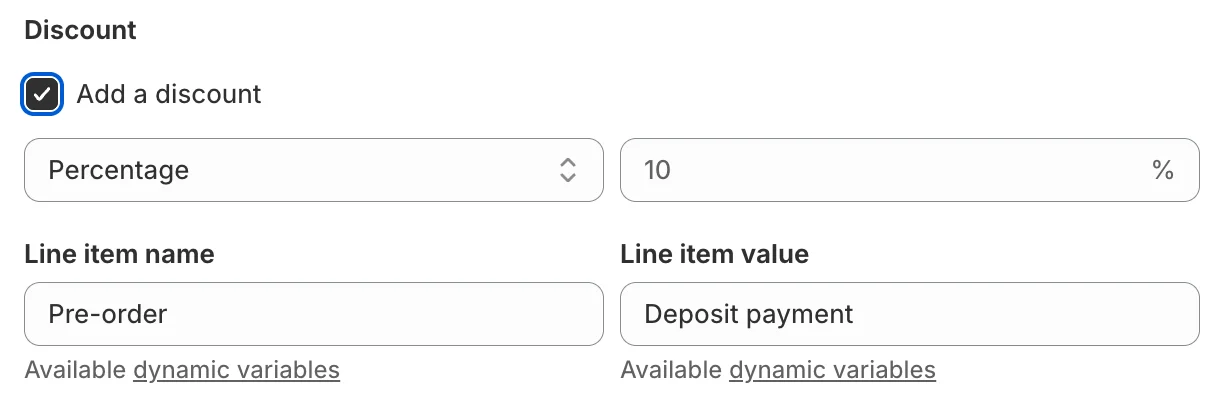
- Set a discount per payment option — percentage or fixed amount off the product price — so you can, for example, give 10% off for paying in full and nothing on the deposit option. Deposit and remaining balance are recalculated from the discounted price automatically.
- Works with both implementation methods (native purchase options and Add to Cart button replacement), and the discount carries through cart, checkout, and order emails.
- The product page shows the original price struck through, the new price, and a Save X label, so shoppers see the saving immediately. The rule editor gives you a live price / deposit / balance breakdown while you set it up.
Discount Design & Naming – Control how the saving looks and what customers call it
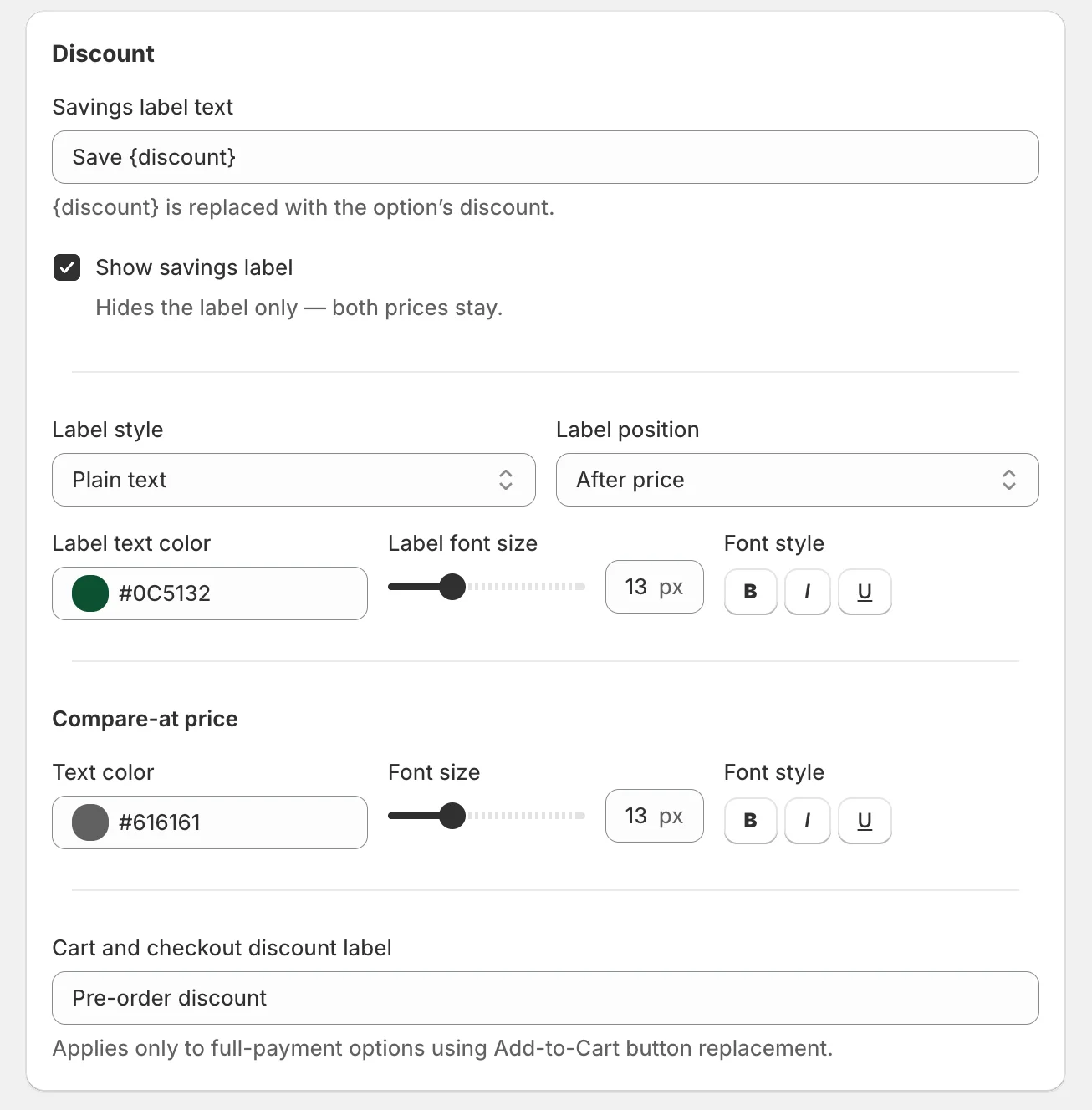
- New Design → Payment widget controls for the savings label and the compare-at price: colour, size, bold / italic / underline, badge or plain, and position — with accessibility-checked defaults.
- Set the buyer-facing discount name shown in the cart, checkout summary, and order emails, and translate it per language in Settings → Translations.
- In Settings → Discounts, choose whether your pre-order discount can combine with other product, order, and shipping discounts.
🛠 Improvements
Payment Options Widget – Cleaner layout on every theme
- Fixed the cramped spacing between the option radio button and its text on themes like Horizon.
- Discounted rows now align properly: a long savings label no longer squeezes the option name, and prices stay readable even in narrow layouts.
🐞 Fixes
- Pre-order products in customer emails: the Pre-order products block came out empty on orders placed through Full payment + Add to Cart button replacement (and on orders whose cart markers were stripped by the theme) — items, images, prices, and the pre-order badge now render correctly.
- Order confirmation email: a line-level discount is no longer listed twice.
- Settings: a failed save no longer hides the Save bar; the cancellation refund window no longer leaves an unclearable save bar or shifts your policy cutoff date; closing the limit-calculation-mode warning now properly cancels the change.
- Design: an out-of-range value no longer silently discards the entire save — you get a clear field-level error instead.
Version 2.29 –
🚀 New Features
Draft Orders Support – Take pre-orders through draft orders and invoice links

- Pre-order products can now be sold through Shopify draft orders: build the order in the admin, send the invoice link, and the customer pays normally even when the item is out of stock or not released yet. Perfect for B2B, wholesale, made-to-order, and phone or email orders.
- Your draft stays exactly as you built it — manually edited line prices, discounts, custom line properties, and the draft's own currency are all kept, and lines outside your pre-order rules are left untouched.
- ⚠️ Important: inside a draft order, stock levels are ignored. Any line whose product is linked to an active pre-order rule counts as a pre-order, even if the item is in stock. The setting is off by default.
Enable it in Settings → Draft orders.
Version 2.28 –
🚀 New Features
Continue Selling Control – Keep "Continue selling when out of stock" on only while a product is actually on pre-order
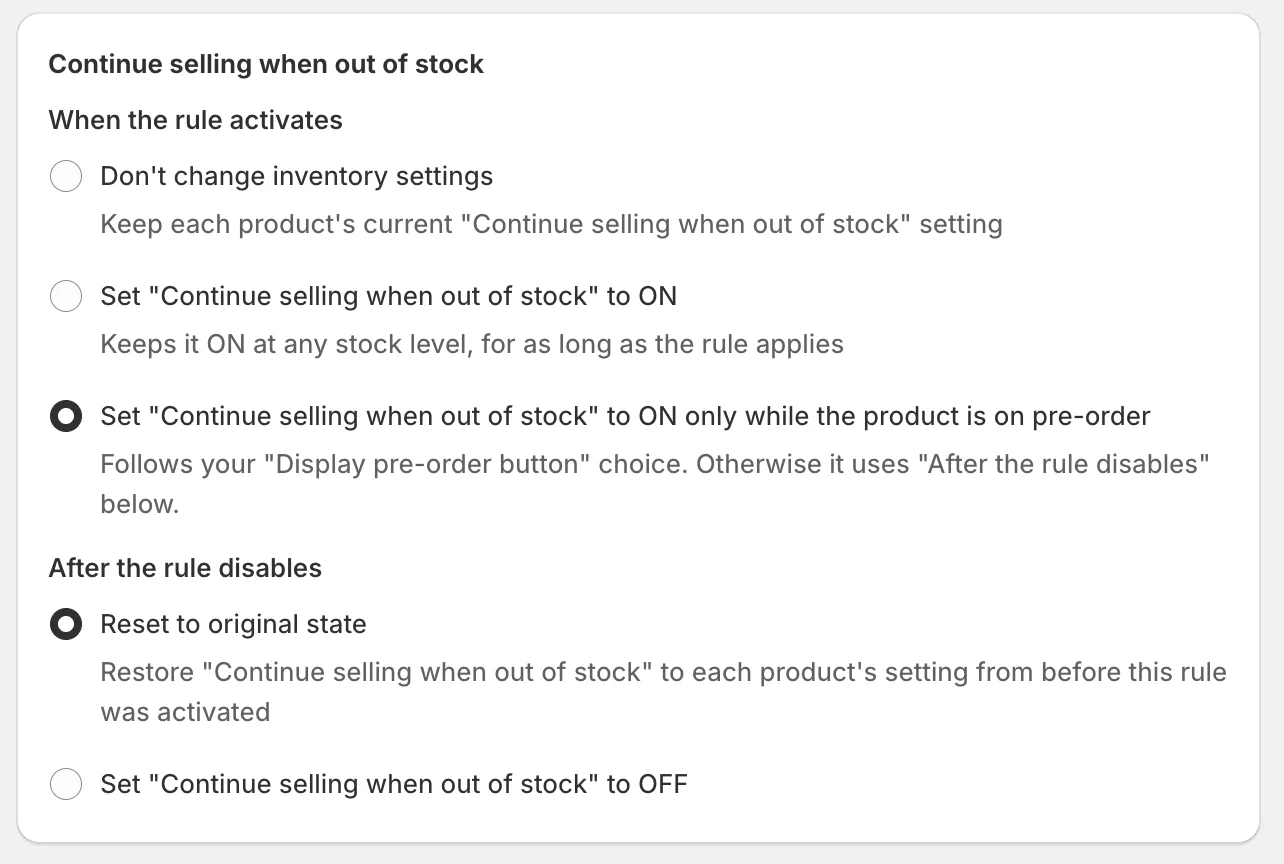
- The Continue selling when out of stock section of your pre-order rule now offers a third choice under When the rule activates: Set "Continue selling when out of stock" to ON only while the product is on pre-order — alongside the existing Don't change inventory settings and Set it to ON for as long as the rule applies.
- With the new option, K1 follows your Display pre-order button choice: while a product is out of stock (or below your threshold) it keeps Continue selling ON, and as soon as the product is back in stock and no longer pre-orderable, it applies your After the rule disables choice instead.
🛠 Improvements
Reliable Rules for Collection Changes Made on the Product – Pre-orders apply even when you edit collections from the product page
- When you add a product to a collection from the product itself rather than from the collection, Shopify sends no notification about it — so a brand-new product could land in a pre-order collection without the pre-order option and stay that way unnoticed.
- K1 now takes a second look at every newly created product shortly after creation, so a product you create and assign to collections in one sitting is picked up correctly even if the assignment happens minutes later.
Version 2.27 –
🛠 Improvements
"My pre-orders" Portal – A more complete and clearer self-service experience for your customers
- The portal now covers every pre-order type, including full payment placed through Add to Cart button replacement and pre-orders with an offline-collected balance — so customers see their entire pre-order history in one place.
- Refund visibility: refunded pre-orders now show a dedicated Refunded line alongside the amount originally collected, giving customers the full payment picture at a glance.
- Clearer amounts and statuses: cancelled pre-orders no longer display an outstanding balance, so the amount always matches the status shown.
- Status badge on the order detail page: the detail view now shows the same status badge as the list, so customers always know exactly where their pre-order stands.
- More accurate connection status: the portal setup indicator now recognizes both customer-account menus Shopify can keep on a store, so it always matches your actual Shopify settings.
Refund Dialog – A clearer distinction between refunding and cancelling
- The refund dialog now states explicitly that refunding doesn't cancel the order — cancel it in Shopify if that's what you need. The note appears both before you confirm and in the confirmation message, so the outcome is never in doubt.
Duplicated Products – Full pre-order support for product copies
- Products created with Shopify's Duplicate action are now registered with K1 automatically, so a copy of a pre-order product is ready to sell right away with the correct pre-order behavior.
- Existing duplicates are brought in line automatically — nothing to do on your side.
Version 2.26 –
🚀 New Features
LayoutHub Integration – Run pre-orders on pages built with LayoutHub
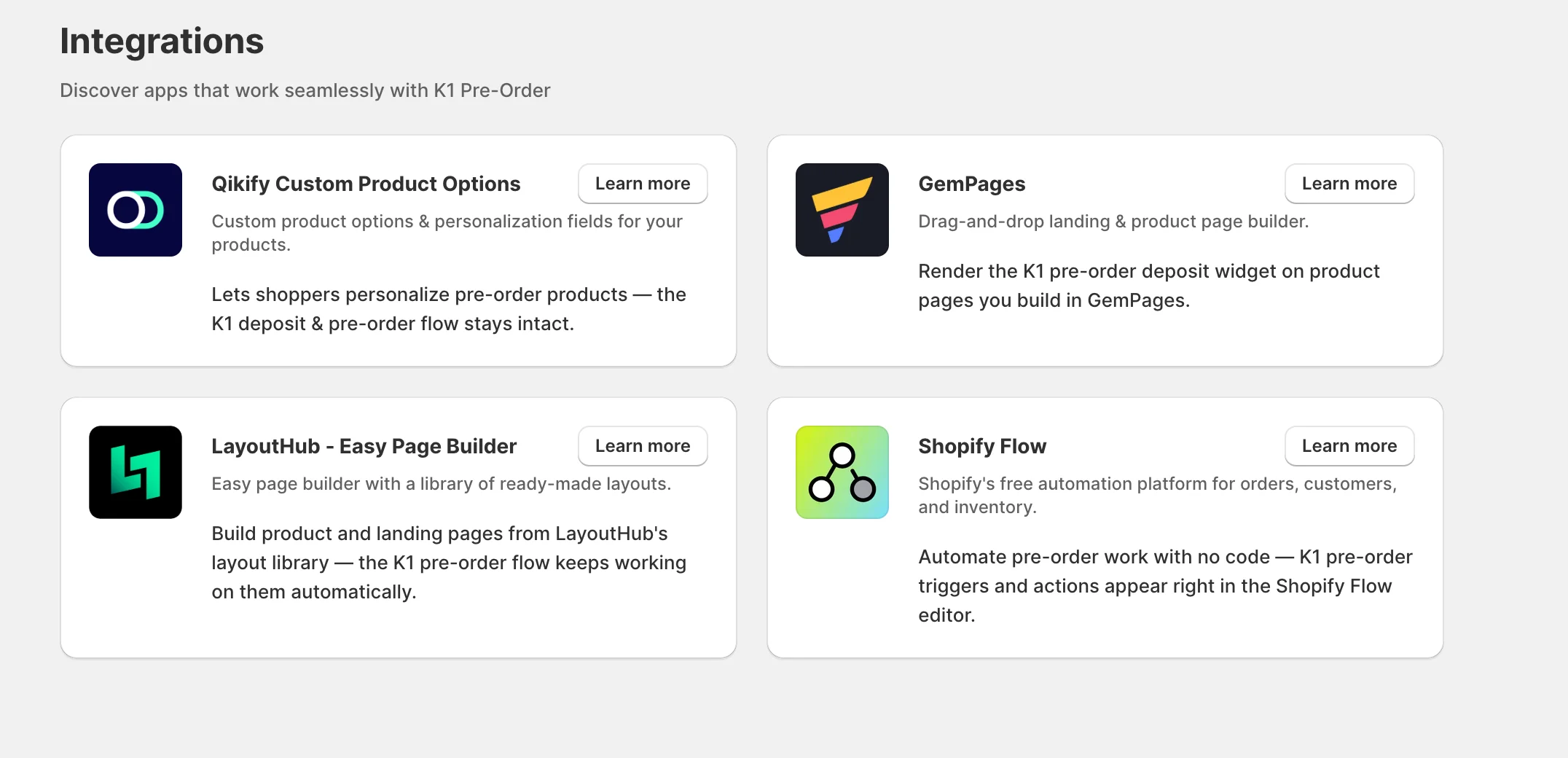
- LayoutHub is a drag-and-drop page builder that assembles product and landing pages from a library of ready-made, conversion-tuned layouts — no coding, live in minutes.
- K1 PreOrder now works on LayoutHub pages automatically: the pre-order badge, your pre-order button in place of Add to cart, and your pre-order message all appear on product pages — including LayoutHub's Quick View and Quick Add — and the cart line is tagged so deposits and scheduled balance payments work end to end.
- No per-page setup and no code: every LayoutHub page, new or existing, picks up pre-orders for any product covered by an active rule.
- If your LayoutHub template supports Shopify app blocks, add the K1 Payment Options block in the theme editor to show the pay-in-full / deposit selector right on the page.
Version 2.25 –
🚀 New Features
Pre-orders Dashboard & Manual Pre-orders – Track every pre-order and create them yourself
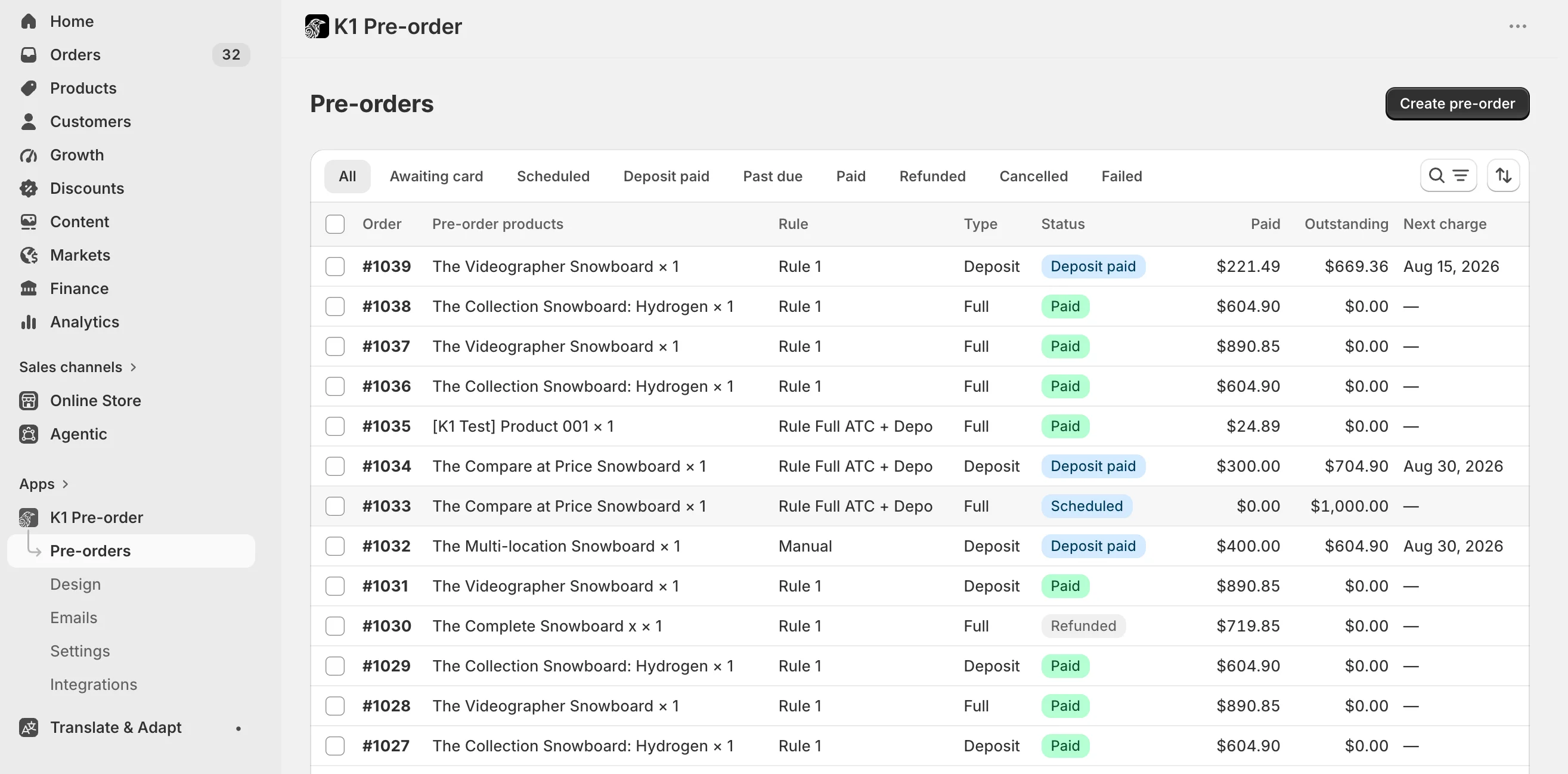
- A new Pre-orders page (first in the app navigation) lists every pre-order from your store — storefront and manual alike — with the order, pre-order products, source rule, payment type, status, amount paid, outstanding balance, and next charge date. Search by customer, order, or product, filter by status and type, and sort any column.
- Open any pre-order to see the full payment breakdown, the customer, a link to the Shopify order, and a timeline of every payment event, including failed attempts and their reason.
- Take control of the money with manual actions: Charge now, Change charge date, Cancel charge, Refund (deposit, balance, full, or a custom amount), and Request card replacement — one at a time or in bulk on selected rows.
- Create a pre-order manually for any customer: pick the customer and products, choose Full payment, Deposit now + balance later, or Card authorization, set the deposit and the charge date, decide whether the balance is auto-charged or collected offline, and add order tags and a line item message.
- The customer confirms with one click: K1 generates a card-confirmation checkout link you can email automatically or copy and send yourself. Their card is saved, so the balance is collected later without contacting them again.
- Viewing the dashboard and running payment actions is available on all plans; creating pre-orders manually requires the Growth plan or higher.
Shopify Flow Integration – Automate your pre-orders without writing code
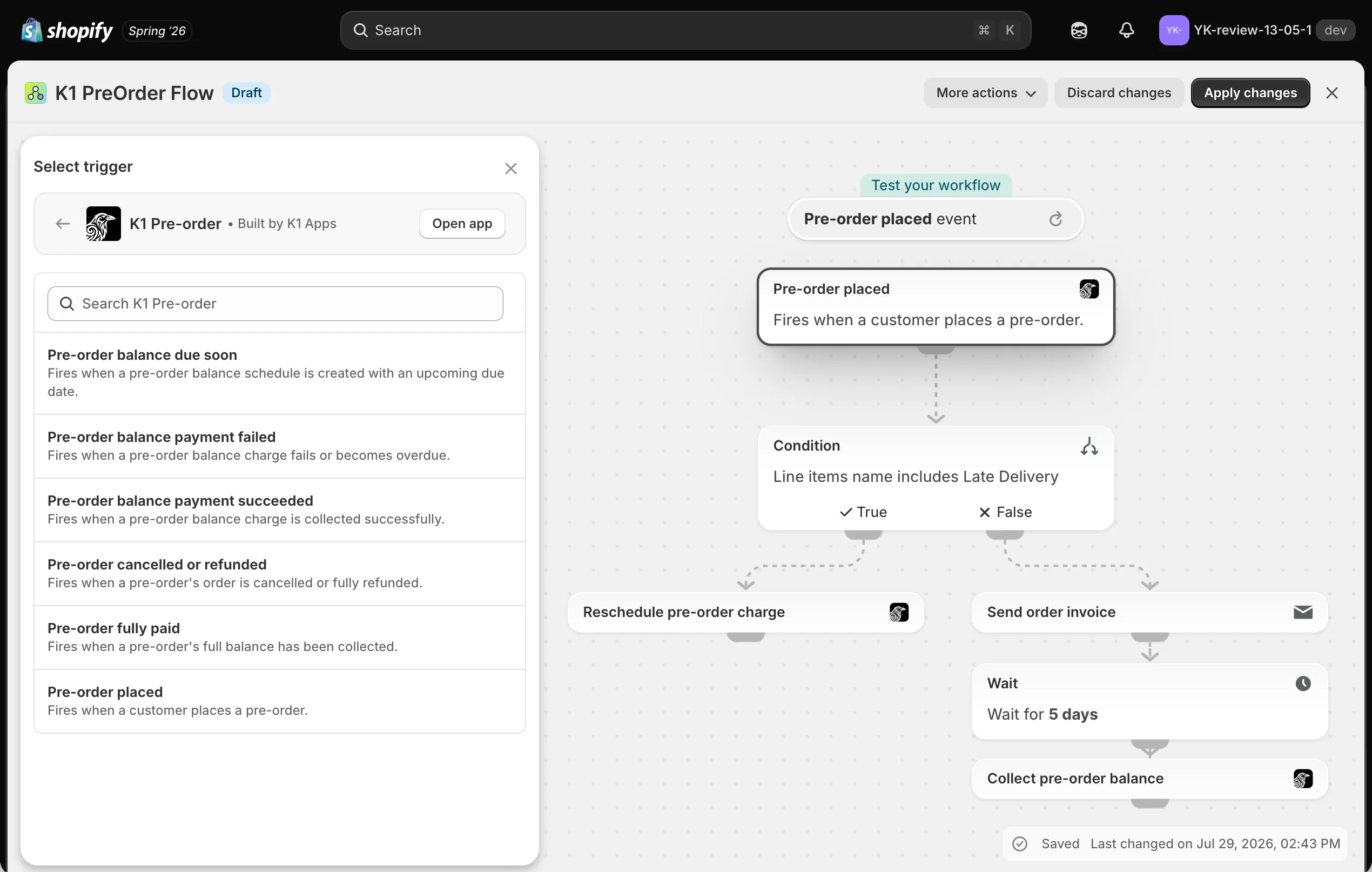
- K1 PreOrder events are now available as Flow triggers: pre-order placed, balance due soon, balance payment succeeded, balance payment failed, pre-order fully paid, and pre-order cancelled or refunded. Each trigger carries the order and the source rule, so you can scope a workflow to one rule with a simple Flow condition.
- K1 operations are now available as Flow actions: charge the balance now, cancel the scheduled charge, reschedule it a number of days from now, request a card update, refund the deposit / balance / full amount / a custom amount, and add or remove a product from a pre-order rule.
- Seven ready-made templates get you started in a click — recover a failed balance charge, release a fulfillment hold once a pre-order is fully paid, escalate an uncollectable balance, notify your team on a new pre-order or a refund, and turn pre-orders on when a product sells out or off when it's back in stock.
- A new Integrations → Shopify Flow page explains everything and links straight into your store's Flow editor. Requires the free Shopify Flow app to be installed.
Version 2.24 –
🚀 New Features
Full Payment + Deposit in One Rule – Offer "Pay in full" on any gateway alongside a deposit option
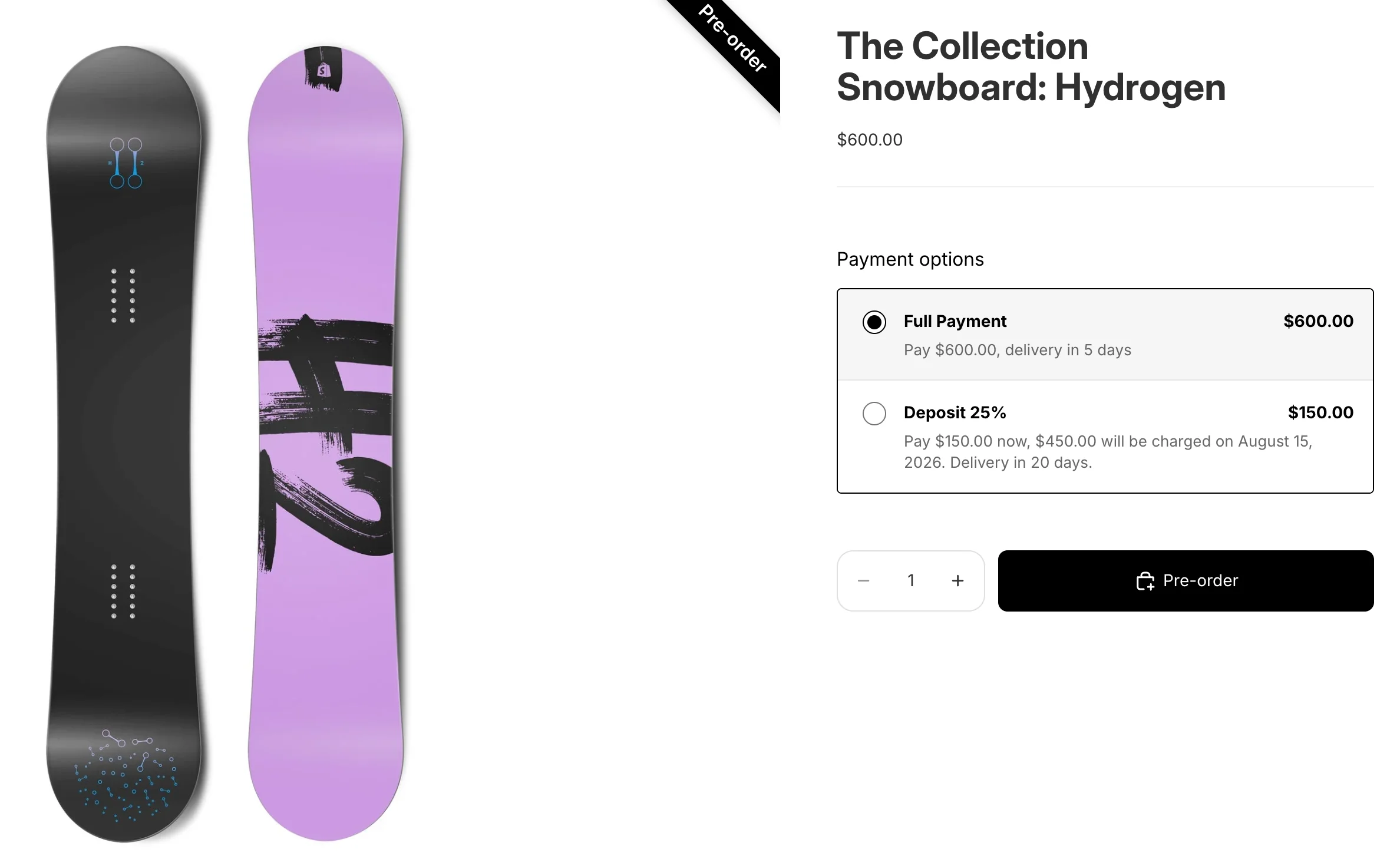
- A single pre-order rule can now combine a Full payment option that uses Add to Cart button replacement with one or more Partial payment (deposit) options — a combination that was previously blocked.
- Why it matters: shoppers paying with Shop Pay, Apple Pay, Google Pay, or a gateway that doesn't support Shopify's native purchase options always have a working "pay in full" path, while everyone else can still choose a deposit. Fewer abandoned pre-orders, no rule duplication.
- Switching the Full payment option between Native purchase option and Add to Cart button replacement no longer deletes your configured deposit options — your setup is kept exactly as it was.
- The Add payment option button is no longer disabled based on the implementation method, and the old "switching will remove all partial payment options" warning is gone.
- On the product page, all options appear in one widget: the Add to Cart button and its behavior switch instantly as the shopper picks a different option — no page reload.
Version 2.23 –
🚀 New Features
Editable Cart Messages – Customize the pre-order cart messages your shoppers see
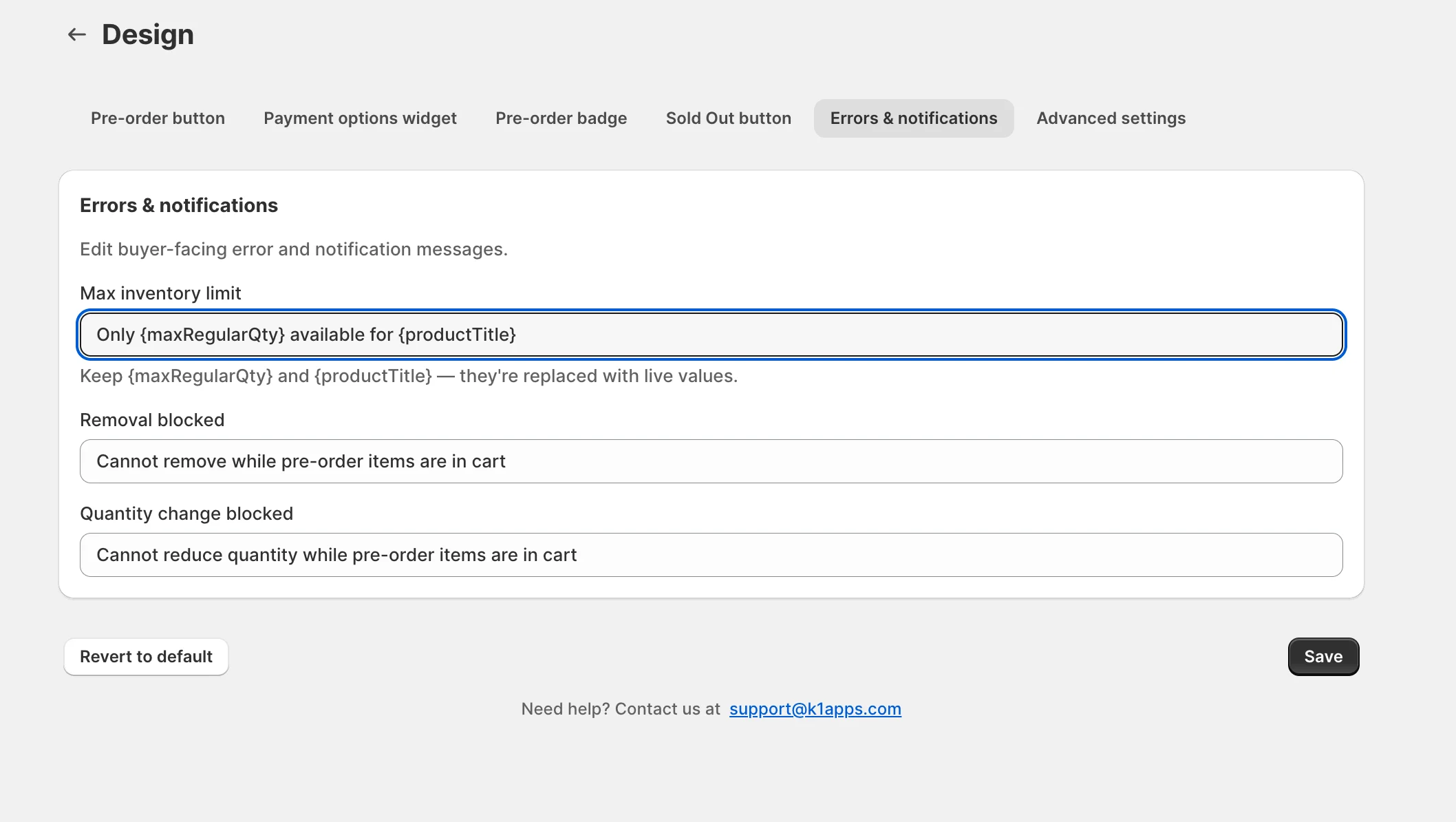
- Edit the wording of all three cart messages right from Design → Errors & notifications:
- Write them in your store's language or match your brand voice, and use Revert to default to restore the original wording anytime.
- The {maxRegularQty} and {productTitle} placeholders keep working — they're filled with live values automatically.
- Previously these texts were fixed in English and could only be translated for secondary languages; now the default itself is yours to edit.
🛠 Improvements
More Reliable Smart Cart Allocation – "Buy in-stock + pre-order the rest," even on fast-moving products
- When a shopper adds more units than you have in stock, K1 automatically splits the order — the available units are purchased now and the extra units become a pre-order.
- On products whose stock changes quickly (fast-selling items, live inventory updates), that split could previously fail and block the whole add-to-cart. K1 now checks your store's live, real-time availability at the moment of adding, so the in-stock portion is always added and the remainder reliably goes to pre-order — no more failed adds on busy products.
Version 2.22 –
🛠 Improvements
Animated Setup Guides – See exactly how to enable K1, step by step
- The Enable app embed and Enable Payment Options block setup steps now show short animated walkthroughs instead of static screenshots, making it clearer how to turn each one on — matching the guided Customer Accounts setup experience.
🐞 Fixes
- "Set up Customer Accounts" button now updates on its own: After you set up the Customer Accounts portal in another browser tab, the Cancel order link card in Emails → Settings now refreshes automatically when you return to the app — the button switches to Use Customer Accounts link without a manual page reload.
Version 2.21 –
✨ A major update — reach your customers, and let them self-serve
This release brings two of our biggest features yet: a complete Custom Email Notifications system and a Customer Accounts self-service experience for pre-orders.
🚀 New Features
Custom Email Notifications – Send branded, automated emails for every pre-order moment
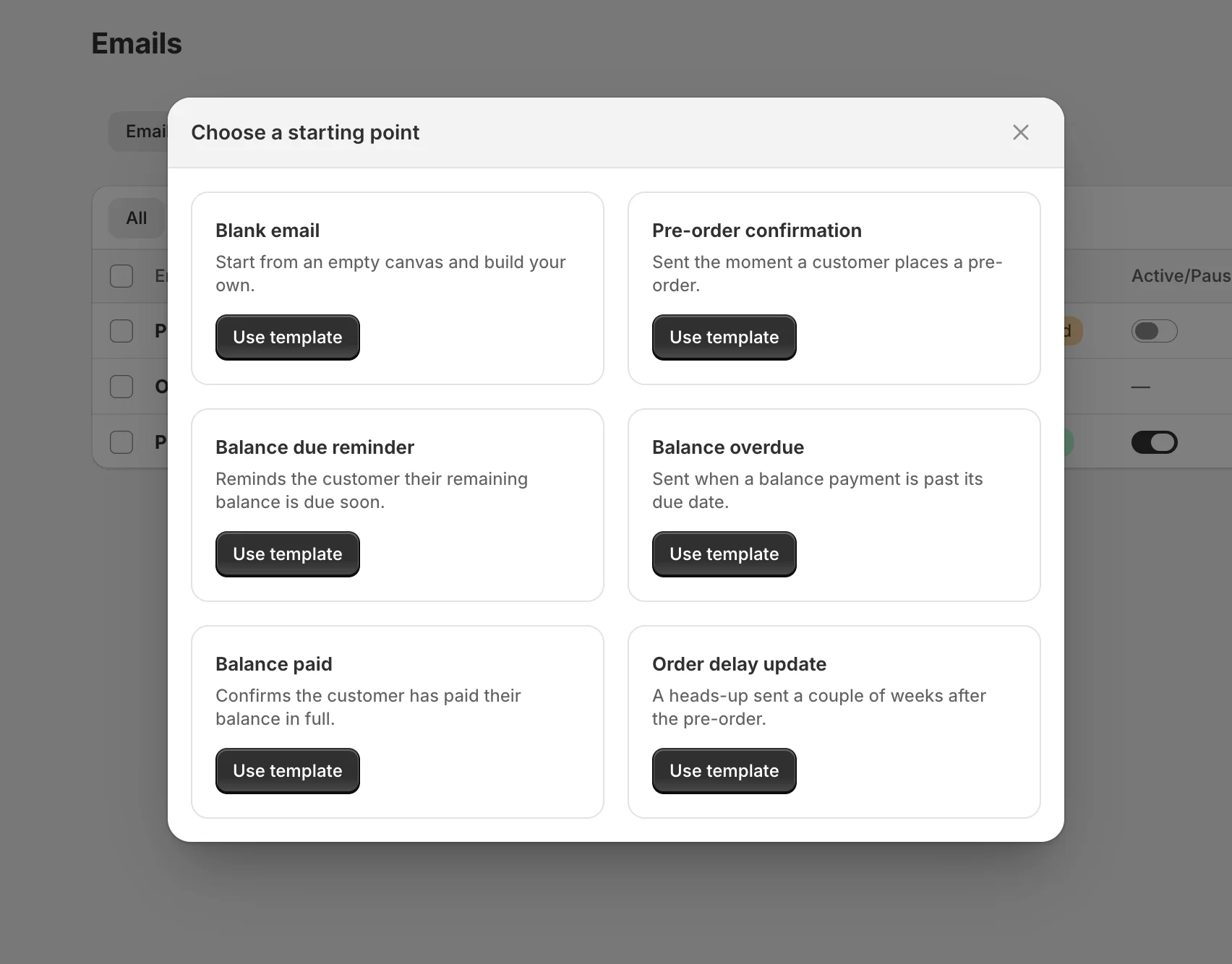
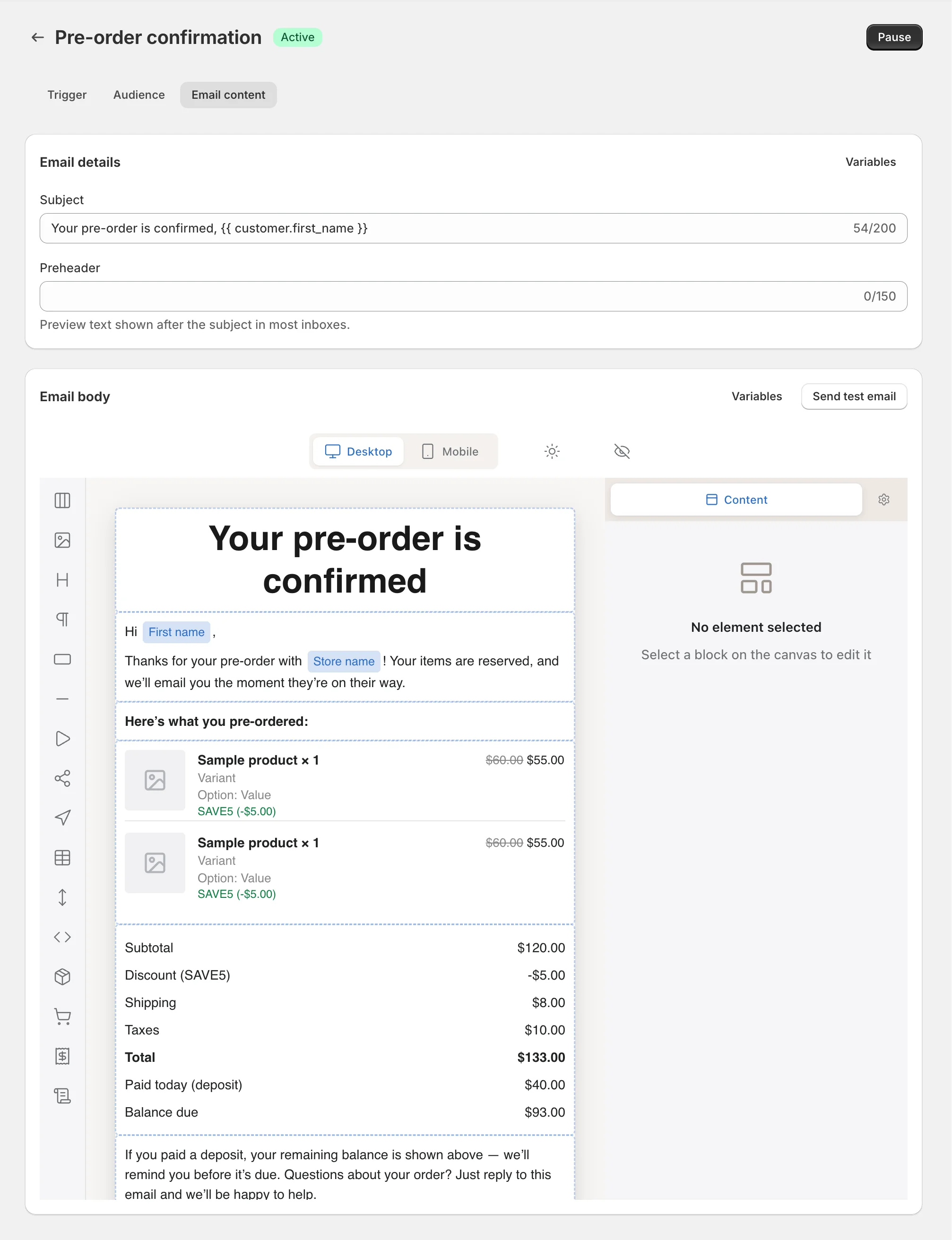
- Create unlimited trigger-based emails that reach customers automatically at key pre-order moments — pre-order placed, balance due, balance overdue / payment failed, balance paid, item fulfilled, and cancelled / refunded.
- Control exactly when each email sends — immediately, or a set number of days before / after the event (e.g. a balance reminder 3 days before the due date).
- Reach the right people with audience conditions on pre-order rules, products, variants, or collections, payment mode, and order tags or a specific set of orders.
- Design emails your way with a drag-and-drop visual editor — headings, images, buttons, and dynamic pre-order product lists — or switch to full HTML / Liquid code mode. Get going fast with ready-made starter templates.
- Personalize every message with dynamic variables like {customer.first_name}, {order.number}, and {partial_payment.balance_due}, plus smart action buttons such as Pay remaining balance and View order.
- Preview in desktop, mobile, and plain-text views and send yourself a test email before going live.
- Measure results with full lifetime statistics — sent, delivered, opened, clicked, bounced, and unsubscribed — with per-customer drill-down and CSV export.
- Send from a ready-to-use {store}@k1preorder.com address (all plans, including Free) or authenticate your own domain (Growth plan and above). Customer replies forward straight to your inbox.
- Stay compliant automatically with a built-in unsubscribe link, a hosted unsubscribe page, and a managed suppression list.
Customer Accounts – Let customers view and manage their pre-orders themselves
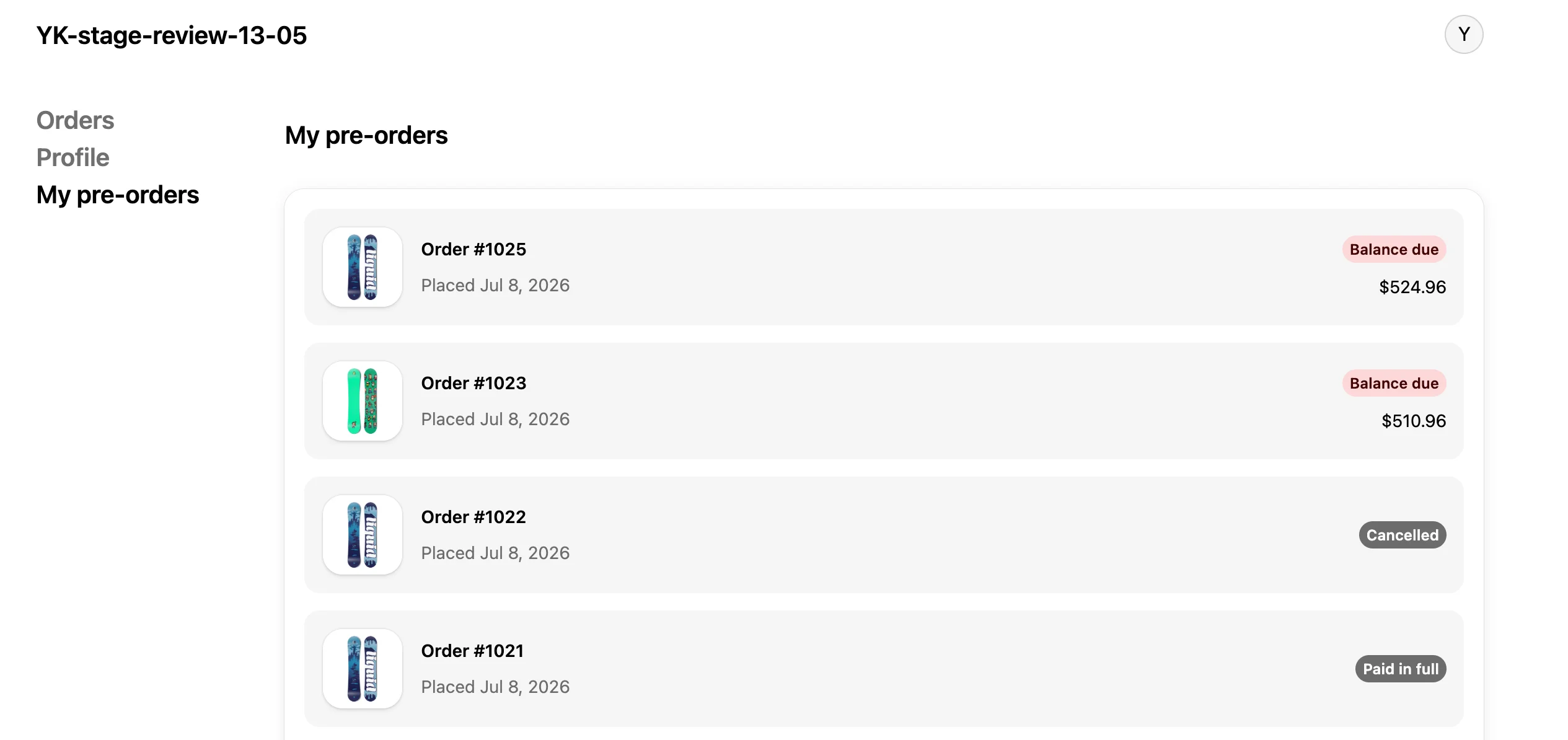
- A new My pre-orders area lives right inside Shopify Customer Accounts (no separate login), where customers see every pre-order — items, deposit paid, balance due, payment schedule, and status.
- Pay now: customers can pay their outstanding balance early — with the saved card on file or a different method via Shopify's secure hosted page (e.g. pay the balance with PayPal even if the deposit was on a card). You decide whether to offer it (off by default).
- Update card: customers can update the saved card used for the upcoming automatic balance charge — no support request needed.
- Self-service cancellation: customers can cancel any pre-order before it's fulfilled, right from their account — with your cancellation terms shown before they confirm.
- Fewer support tickets — customers self-serve the most common balance and cancellation requests, in fully translatable buyer-facing copy.
Version 2.20 –
🚀 New Features
Cancellation & Refund Management – Decide what customers can cancel and exactly what gets refunded
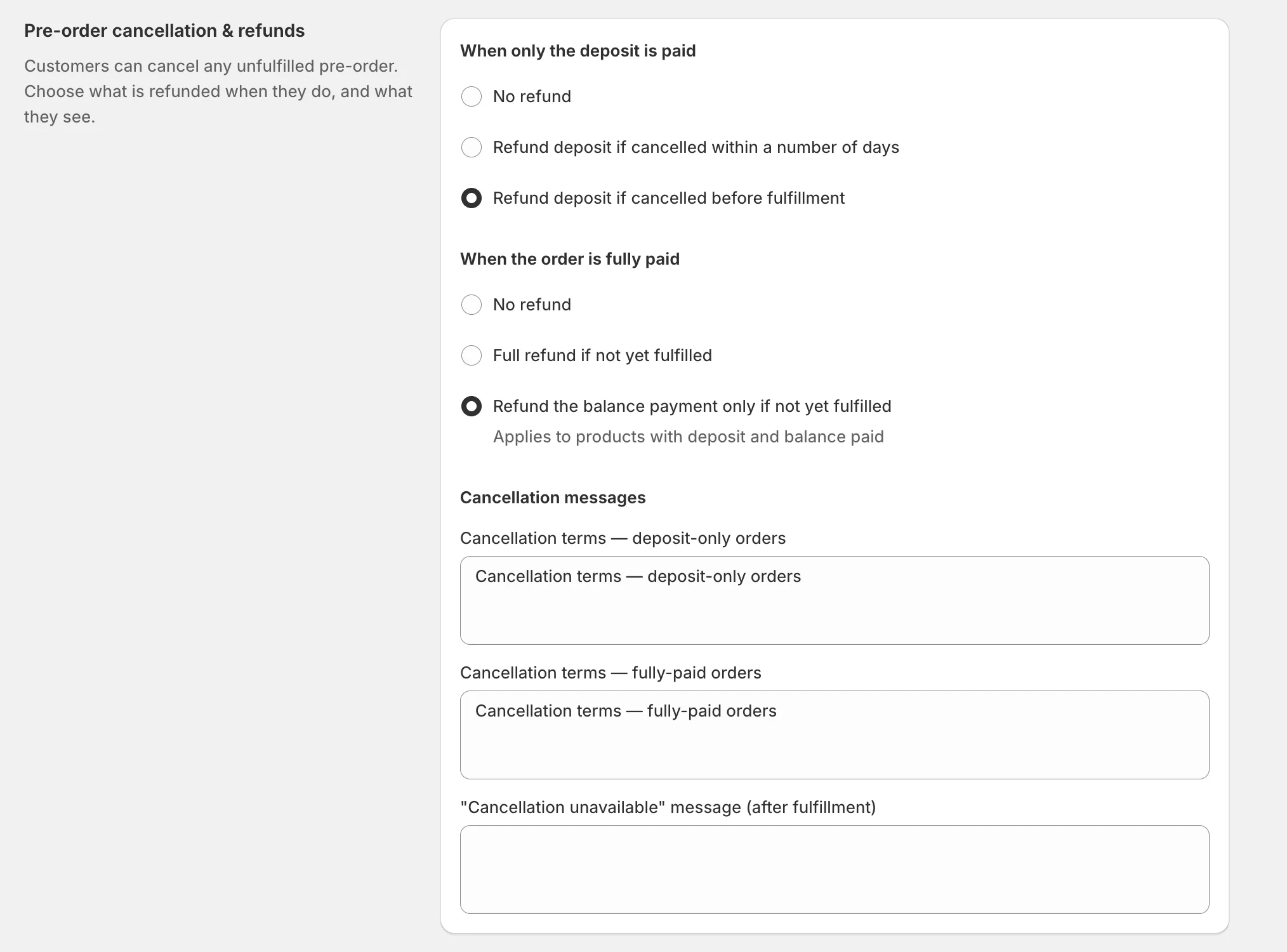
- Set independent refund rules for deposit-only and fully-paid orders, so self-service cancellations always follow the policy you choose.
- When only the deposit is paid: choose No refund, Refund deposit if cancelled within a number of days, or Refund deposit if cancelled before fulfillment.
- When the order is fully paid: choose No refund, Full refund if not yet fulfilled, or Refund the balance payment only if not yet fulfilled.
- Write your own cancellation terms — separately for deposit-only and fully-paid orders — shown to customers before they confirm a cancellation.
- Set a "cancellation unavailable" message for orders that can no longer be cancelled (after fulfillment).
- Choose whether policy changes apply to new pre-orders only or new + existing pre-orders.
Version 2.19 –
🚀 New Features
GemPages Integration – Show your pre-order payment options on pages built with GemPages
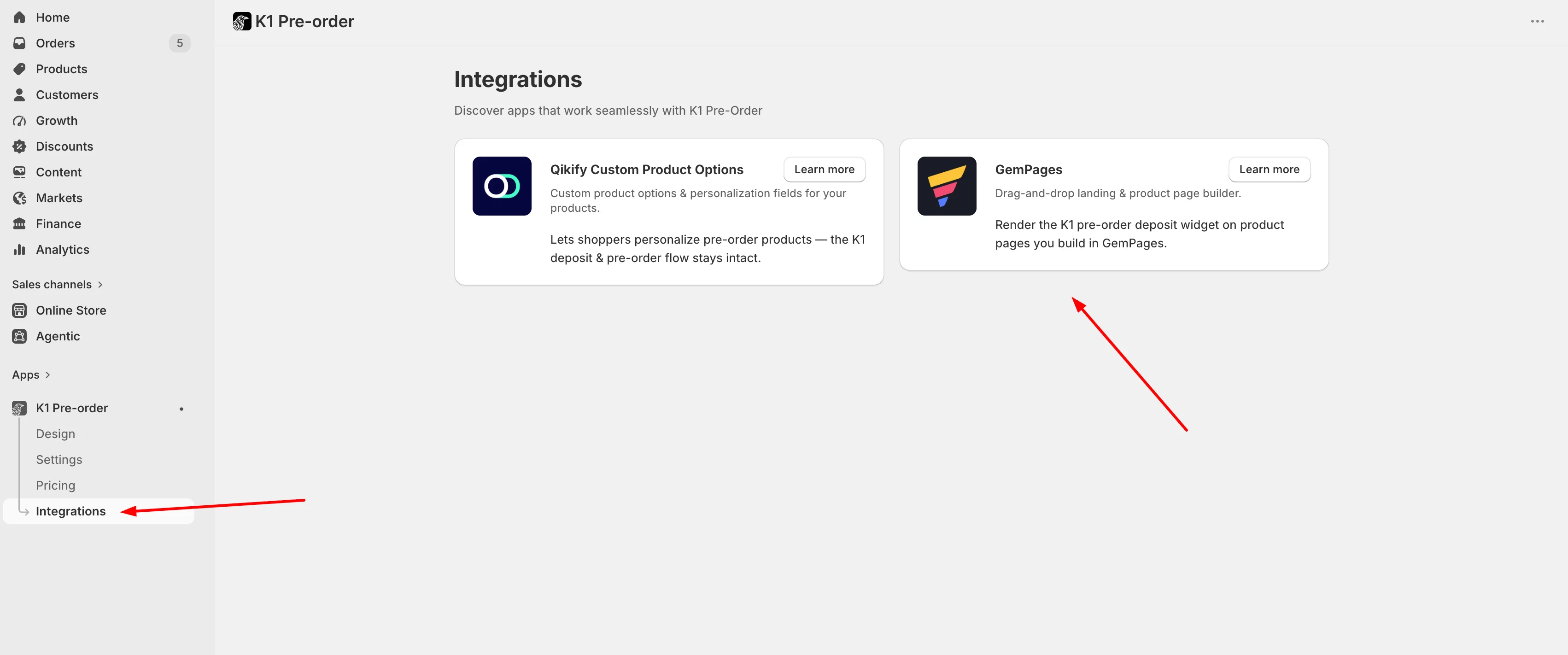
- GemPages is one of Shopify's most popular drag-and-drop page builders — it lets you design custom, high-converting product and landing pages without writing any code, which makes it a favorite for product launches and pre-order campaigns.
- Because page builders replace Shopify's native product section, the K1 Payment Options widget (the deposit / partial-payment selector) couldn't be placed on GemPages product pages the usual way. This update solves that.
- A new Integrations → GemPages page inside the app walks you through setup step by step:
- It runs against your already-active K1 setup, so there are no theme changes or developer help required — and the deposit / partial-payment selector shows up right where your customers need it.
Version 2.18 –
🚀 New Features
Cart Price Display for Partial Payments – Show the deposit amount instead of the full price in the cart
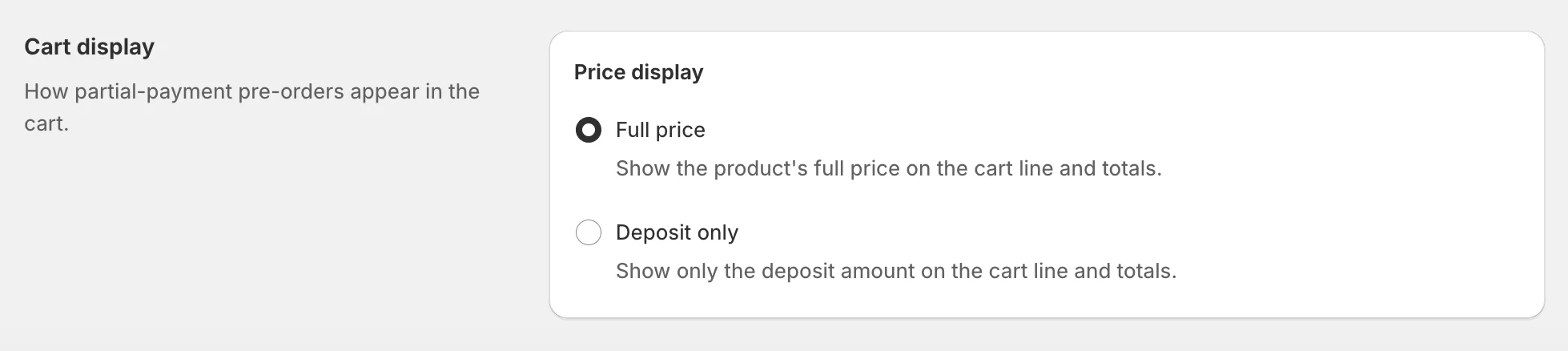
- A new Price display setting in Settings → Cart display controls how partial-payment pre-orders appear in the cart. Choose Full price (default — shows the product's full price on the cart line and totals) or Deposit only (the cart line and totals show just the amount the customer pays today).
- Ideal for stores whose customers find a full-price line confusing after choosing a deposit-based payment option — now the cart reflects exactly what they pay now.
- The rule editor's Cart preview follows the same setting, so you can confirm how it looks before going live.
- Heads up: In Deposit only mode, discounts may display incorrectly in the cart (price calculation with discounts). This is a Shopify limitation and outside our control — learn more.
Version 2.17 –
🛠 Improvements
Pre-Order Bypass Protection – Pre-order-only products can't be bought as regular purchases
- Products meant to sell only via pre-order (out-of-stock or "always pre-order" mode) can no longer be checked out as a regular purchase.
- Protection now runs on the server across every storefront (including V2) and covers all paths — native button, accelerated checkout (Shop Pay, PayPal, Apple Pay, Google Pay), quick-add, and direct add-to-cart — so you no longer receive regular orders for stock you don't have.
- Legitimate in-stock purchases and Smart Cart Allocation are unaffected.
🐞 Fixes
- Editing variants in a rule: Removing a product's variants via the Edit link now works correctly — the variant count updates and the Save button appears so your change can be saved (previously only Browse worked). Opening Edit without making changes no longer shows a false "unsaved changes" prompt.
Version 2.16 –
🛠 Improvements
Reliable Activation for Large Collections – Fully applied, every time, at any size
- Activating a pre-order rule on a large collection (thousands of products) now completes fully and reliably — every product in the collection gets the pre-order option, with no silent gaps where some items were left without the widget.
- Products with many variants are no longer truncated, so variant-heavy catalogs are covered completely.
- Re-activating an unchanged rule is now near-instant, and running several activations at once no longer slows each other down.
🐞 Fixes
- Rule Preview: Preview now opens the storefront on a variant the rule applies to, so the pre-order option is visible for variant-specific rules — instead of always opening the product's first variant.
Version 2.15 –
🐞 Fixes
- HEX color fields: You can now type or paste a HEX code directly into the color fields in Design — previously only the swatch picker worked. Applies to all four Design tabs (Pre-order button, Payment Options Widget, Pre-order Badge, Sold Out button).
Version 2.14 –
🛠 Improvements
Sold Out Button Design – Your Sold Out button, now live in your brand's style
- Custom background, text color, border, and corner radius set in Design → Sold Out button now apply to the live storefront button, instead of falling back to the default grey style.
- Existing stores were updated automatically — your saved design shows up with no need to re-open and re-save it.
🐞 Fixes
Cart Allocation – Now activates the moment you turn it on
- When Cart Allocation is enabled, shoppers can now add more than the in-stock quantity — the surplus is placed on a pre-order line instead of being blocked with an "already sold out" message at the cart.
- The setting now reaches your storefront immediately when enabled, and correctly stays off for stores that haven't turned it on — no more unexpected cart behavior.
Bulk Reset of Pre-Order Limits – Your setup is preserved
- Bulk-resetting pre-order limit counters now keeps your configured limit and reopens the product for sale, instead of clearing the limit and leaving items locked.
Version 2.13 –
🛠 Improvements
Accurate Plan Usage in Every Currency – Pre-order revenue measured correctly no matter your store currency
- If your store sells in a currency other than USD, your pre-order revenue is now measured correctly against your plan's limits — so you'll never hit a limit earlier than you actually should.
More Dependable Purchase Limits – Consistent enforcement in cart and checkout
- Per-product pre-order limits are now enforced consistently in the cart and at checkout, even if you don't use cart allocation.
- The Manage Limits screen is tidier too — leftover and empty rows no longer show up.
Smoother Storefront for Shoppers – Stable pre-order button across variants and themes
- Your pre-order button now stays in place when customers switch between product variants — including on newer themes like Horizon.
- Removed a brief "sold out" flicker some stores were seeing.
Reliability & Security Upgrades – Behind-the-scenes work to keep pre-orders fast and rock-solid
- Significant reliability and security upgrades keep your store's pre-orders fast and stable, plus better monitoring so our team can spot and resolve any issue faster.
🐞 Fixes
- Paused rule editing: Editing a paused rule no longer turns it back on by accident.
- Collection-based rules: Adding a collection to an active collection-based rule now correctly applies pre-orders to that collection's products.
- Cart line item text: Cart line items now always display the current, correct pre-order text.
Version 2.12 –
🛠 Improvements
Cleaner Order Tags – K1 tags no longer appear on regular orders
- Pre-order allocation tags (such as
_allocation: regular) are now applied only to actual pre-order orders — not to regular orders that happen to contain products included in a pre-order rule. - Keeps your Shopify order list clean and removes confusion, so you no longer see unexpected K1-related tags on standard purchases.
Version 2.11 –
🚀 New Features
Pre-Order Limits – Cap pre-order quantities per product or variant to prevent overselling
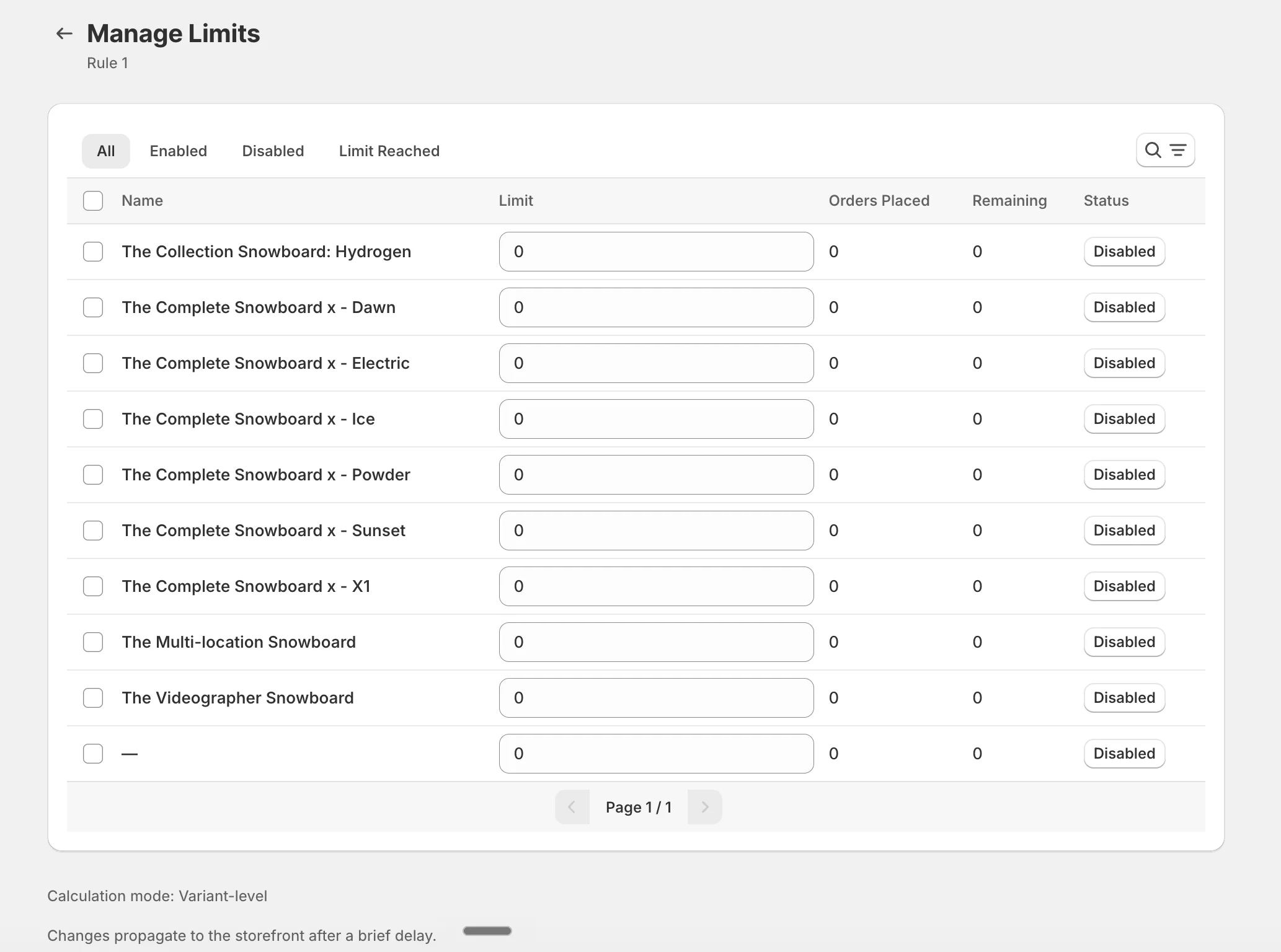
- Set a maximum number of pre-order units per rule so you never accept more than you can fulfill — choose Variant-level tracking (each variant has its own independent limit, recommended) or Product-level tracking (all variants share one collective limit) in the global Pre-Order Limits settings.
- Manage everything from a dedicated Manage Limits page — edit limits inline or in bulk, and quickly find what you need with search and filters by status, remaining quantity, or collection.
- When a limit is reached, the storefront automatically swaps the pre-order button for a fully customizable, translatable Sold Out button — and you can drive urgency with the new {remaining_limit} variable in your pre-order message to show shoppers exactly how many slots are left.
- Smart automation keeps limits in sync with real demand: reset on restock clears the counter when inventory returns, and restore on cancel/refund frees up slots when orders are cancelled or refunded.
Version 2.10 –
🚀 New Features
Fulfillment Auto-Actions – Automatically charge or close the balance the moment a pre-order is fulfilled
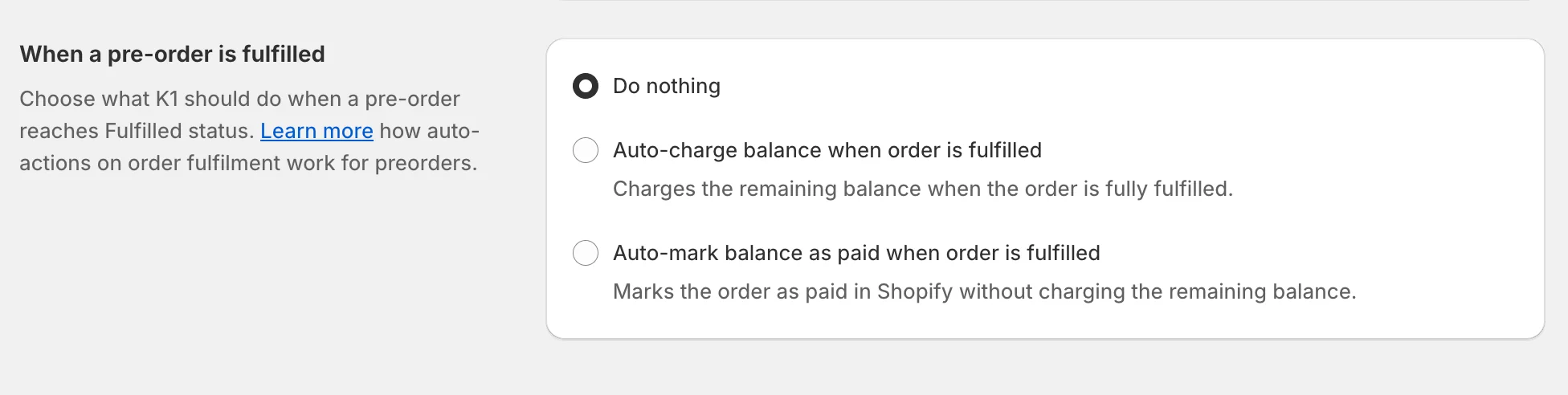
- New app-level setting lets merchants decide what K1 should do automatically when a pre-order reaches Fulfilled status in Shopify: Do nothing (default), Auto-charge balance (captures the remaining balance via the saved payment method), or Auto-mark balance as paid (closes the balance in Shopify without charging).
- Auto-mark balance as paid is ideal for merchants collecting the balance offline — in-store pickup, cash on delivery, wire transfer, or B2B invoice — keeping Shopify order statuses tidy without manual updates.
- Triggers only when the entire order reaches fully-fulfilled state, and never double-charges: if fulfillment captures the balance first, the rule's scheduled charge is suppressed, and vice versa.
- Full setup details, behavior, and edge cases are documented in the Help Center: Auto-actions on order fulfillment.
Version 2.9 –
🚀 New Features
Offline Balance Collection – Take deposits online, collect the balance offline
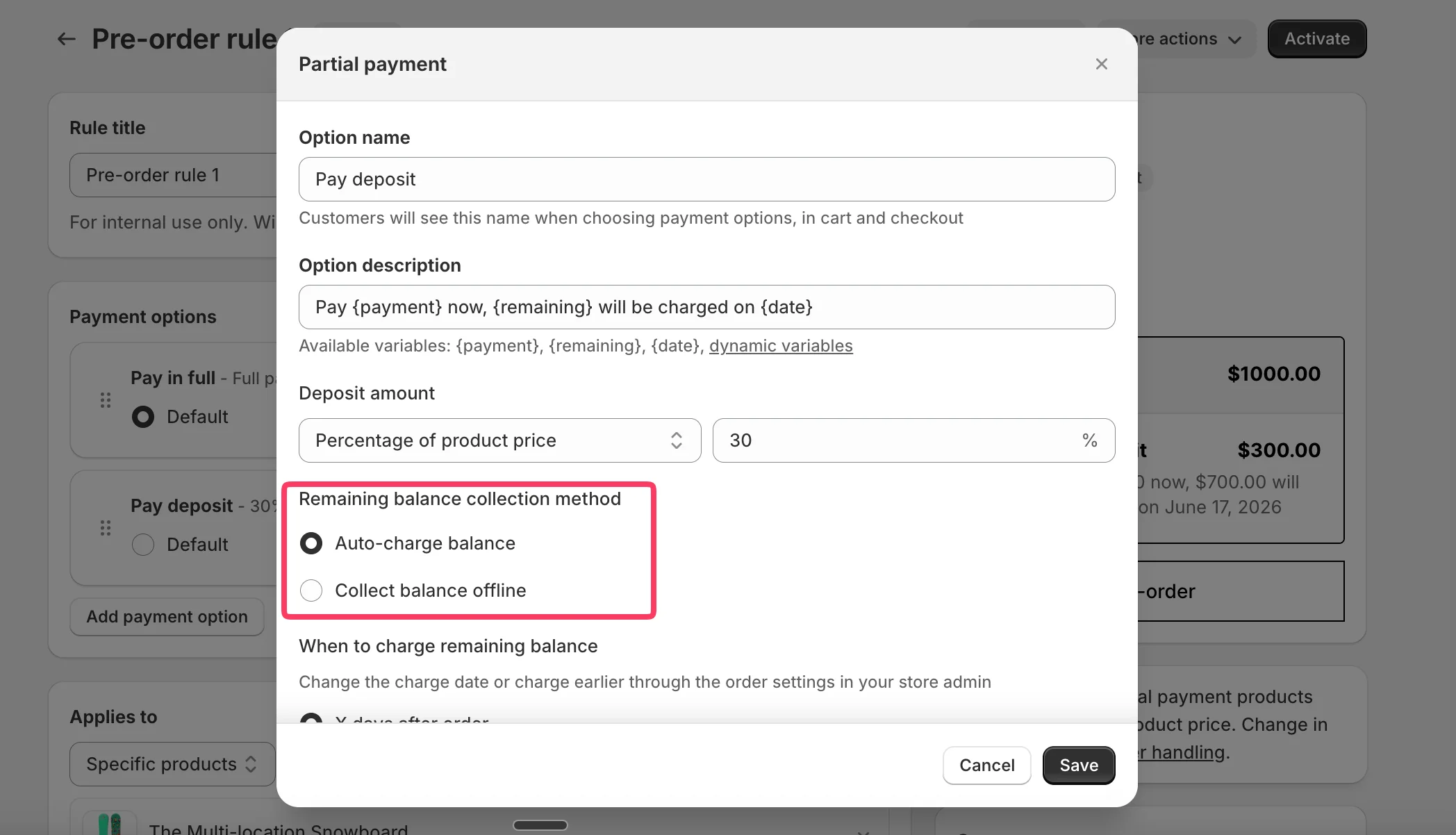
- New Remaining balance collection method option inside Partial Payment rules lets merchants accept a deposit online while collecting the remaining balance offline — in-store pickup, cash on delivery, wire transfer, or B2B invoice.
- Choose between Auto-charge balance (existing behavior — balance auto-charged via Shopify's mandate flow) and Collect balance offline (no automatic charge — merchant closes the balance manually).
- When Collect balance offline is selected, merchants close the remaining balance using Shopify's native Mark as paid action in the order details.
- Ideal for B2B sellers, made-to-order businesses, high-ticket items, and any workflow where the final payment is handled outside Shopify's online checkout.
- Default message and inline item text automatically adapt to manual mode (the
{date}variable is removed where it doesn't apply), keeping messaging clear for customers. - Existing rules and orders are unaffected — changing the method on an existing rule applies to new orders only.
Version 2.8 –
🛠 Improvements
Metafield-Based Backend Architecture – Major stability upgrade for pre-order state management
- Reworked the foundational backend logic to use Shopify metafields as the primary source of truth for pre-order product state, replacing the previous data handling approach.
- This new architecture significantly improves data consistency across storefront, cart, checkout, and admin, ensuring pre-order states stay accurate even during heavy catalog updates or peak traffic.
- Reduces edge-case errors caused by delayed or partial Shopify API responses — pre-order states now persist reliably on the product itself, making them resilient to temporary API issues.
- Faster rule application and more accurate synchronization between K1 PreOrder and Shopify, especially noticeable for stores with large catalogs, complex rule setups, and frequent inventory changes.
- Improved long-term scalability: the new foundation enables faster feature development and more reliable performance for high-volume stores.
Enhanced Webhook Monitoring – More reliable real-time updates from Shopify
- Improved internal tracking and processing of Shopify webhook activity ensures the app reliably detects and responds to product, inventory, and order events in real time.
- Reduces missed events that could previously cause delayed rule activation, inconsistent inventory states, or out-of-sync product information on the storefront.
- More accurate and faster reflection of Shopify changes inside the app — updates to products, collections, and inventory propagate to pre-order rules with greater consistency.
- Stronger reliability during high-traffic periods, when webhook delivery is most prone to delays.
Version 2.7 –
🛠 Improvements
Major Performance Upgrade – Faster, more stable day‑to‑day operations
- Delivered a series of infrastructure and server-side updates focused on improving overall system and rules performance, so the app runs faster and more efficiently during everyday work.
- Strengthened reliability of data exchange with Shopify API, ensuring more consistent and stable retrieval of product, inventory, and order information.
Version 2.6 –
🚀 New Features
New Knowledge Base Article Access – Get clear guidance on Native Payment Methods vs Add-to-Cart Replacement
- Added a new Knowledge Base article explaining the difference between Native payment methods and Add to cart replacement, so merchants can choose the right setup with more confidence.
- The article is now accessible directly from the app, making it faster and easier to find the details when needed: Native Purchase Options limitations
🛠 Improvements
Translation Error Messages for Smart Cart Inventory – Clearer messaging when items can’t be ordered due to stock
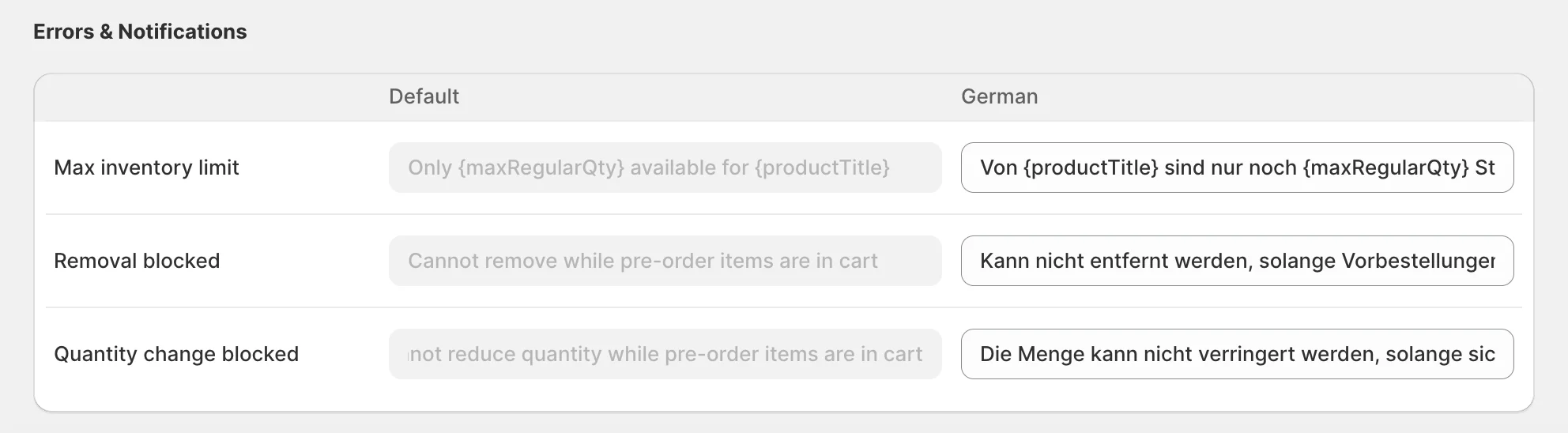
- Added new translatable Errors & Notifications messages shown when customers attempt to order an out-of-stock item under Smart Cart Inventory rules.
Version 2.5 –
🛠 Improvements
Major System Update & App Stabilization – Faster, smoother, more reliable day‑to‑day usage
- Delivered a major internal update focused on stability and long‑term reliability, so the app runs more consistently during everyday work.
- Improved overall responsiveness and reduced edge‑case errors — especially helpful for stores with large catalogs and heavier rule setups.
🐞 Fixes
Conflicts System Reliability – More stable conflict checks for very large rules
- Fixed and strengthened conflict detection and processing for very large rules, reducing incorrect conflict states and making results more consistent.
Version 2.4 –
🛠 Improvements
Notification System Checks – More reliable alerts when theme integration is disabled
- Added extra validation to prevent misleading notifications when the App embed and/or App block is disabled, so merchants get clearer, more accurate status updates.
Performance & Stability Updates – Faster, smoother app experience
- General performance and stability improvements to keep the app responsive and reliable during daily use.
Smart Cart Inventory Optimization – More consistent cart validation
- Optimized Smart Cart Inventory Allocation behavior and improved validation when products are added to cart, reducing edge-case issues and improving consistency.
Version 2.3 –
🚀 New Features
Smart Cart Inventory Allocation – Automatically split in‑stock and pre‑order quantities in one cart

- When a customer adds more units than you have available, the cart automatically splits the item into regular (in‑stock) and pre‑order line items — so you can capture more sales without overselling inventory.
- Create a smoother shopper experience by keeping availability clear at every step in cart and checkout, even when stock is limited.
- Reduce fulfillment confusion by keeping in‑stock items and pre‑order items clearly separated for operations.
- Prioritize in‑stock items first with the optional setting that prevents shoppers from reducing regular item quantities while pre‑order items are present — ensuring available stock is always purchased before pre‑orders.
- Unlock higher average order value during stockouts with a capability that is not available in other pre‑order apps.
Theme Editor Preview for Pre‑Order Elements – See how badges, buttons, messages, and widgets look before going live
- Preview key pre‑order elements directly inside Shopify’s theme editor using your real Design settings, without affecting the live storefront.
- Toggle individual preview elements to verify layout and styling before enabling pre‑orders for customers.
🛠 Improvements
Error Handling Upgrade – Clearer, more reliable behavior when something goes wrong
- Improved error handling across the app to reduce failed actions and provide clearer feedback when an issue occurs.
Version 2.2 –
🛠 Improvements
Storefront Compatibility Update – Stable pre‑order elements after Shopify system updates
- Improved storefront adaptation to ensure pre‑order widget, payment options, buttons, badges, and messaging render correctly and consistently after Shopify system updates across supported themes.
Payment Options Processing Update – Correct handling and display for large rules
- Improved correctness of Payment Options processing for pre‑order rules with a large number of products, ensuring the right options are applied and displayed reliably across storefront and checkout.
Version 2.1 –
🚀 New Features
Qikify Custom Product Options Integration – Pre-orders meet unlimited product customization

- Seamless integration with Qikify Custom Product Options enables pre-orders on fully customized products
- Sell personalized items before they're in stock – capture demand for engraved jewelry, custom apparel, personalized gifts, and made-to-order furniture even during stockouts
- K1 PreOrder button appears naturally alongside all Qikify customization fields with automatic price calculations for add-ons and deposit amounts
- All customization details carry through from cart to order confirmation to fulfillment
- Offer deposits on high-value custom orders to reduce friction on expensive personalized items
Learn more: K1 PreOrder & Qikify Integration Partnership
Version 2.0 –
🎉 Major Release: K1 PreOrder V2 is here!
Version 2.0 represents a complete transformation of K1 PreOrder, introducing flexible payment options and significant architectural improvements. This is our most substantial update yet, leveraging Shopify's Deferred Purchase Options API to unlock capabilities that weren't possible before.
🚀 New Features
Split Payments & Deposits – Revolutionary payment flexibility for pre-orders
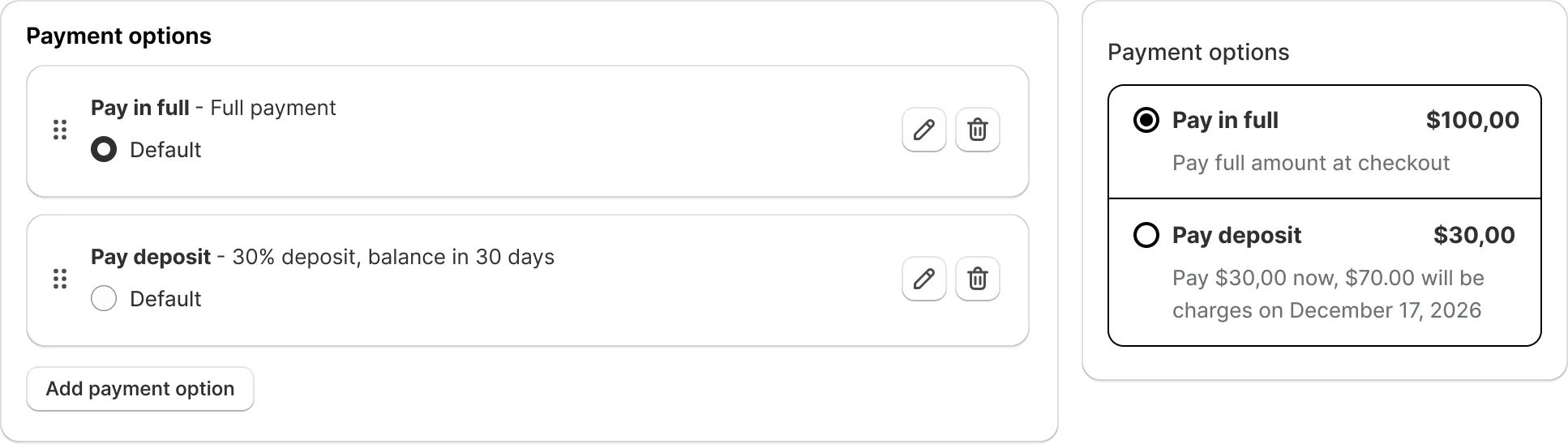
- Create multiple payment options within a single pre-order rule: full payment, percentage-based deposits (e.g., 30%), or fixed amount deposits (e.g., $50)
- Customers choose the payment option that works best for them at checkout
- Lower barrier to entry for high-ticket items increases conversion rates and reduces cart abandonment
- Automatic balance collection handled by Shopify according to your schedule
- Dynamic messaging with variables shows customers exactly what they pay today and when balance is due
- Payment-specific order tagging enables workflow segmentation based on chosen payment method
- Improved cash flow management: collect deposits immediately to fund production or procurement
- Supported payment gateways: Shopify Payments, PayPal Express Checkout, Adyen on Shopify, Stripe (limited availability)
- Full payment option with button replacement continues working with any payment gateway
Enhanced Widget Customization – Complete control over payment option display
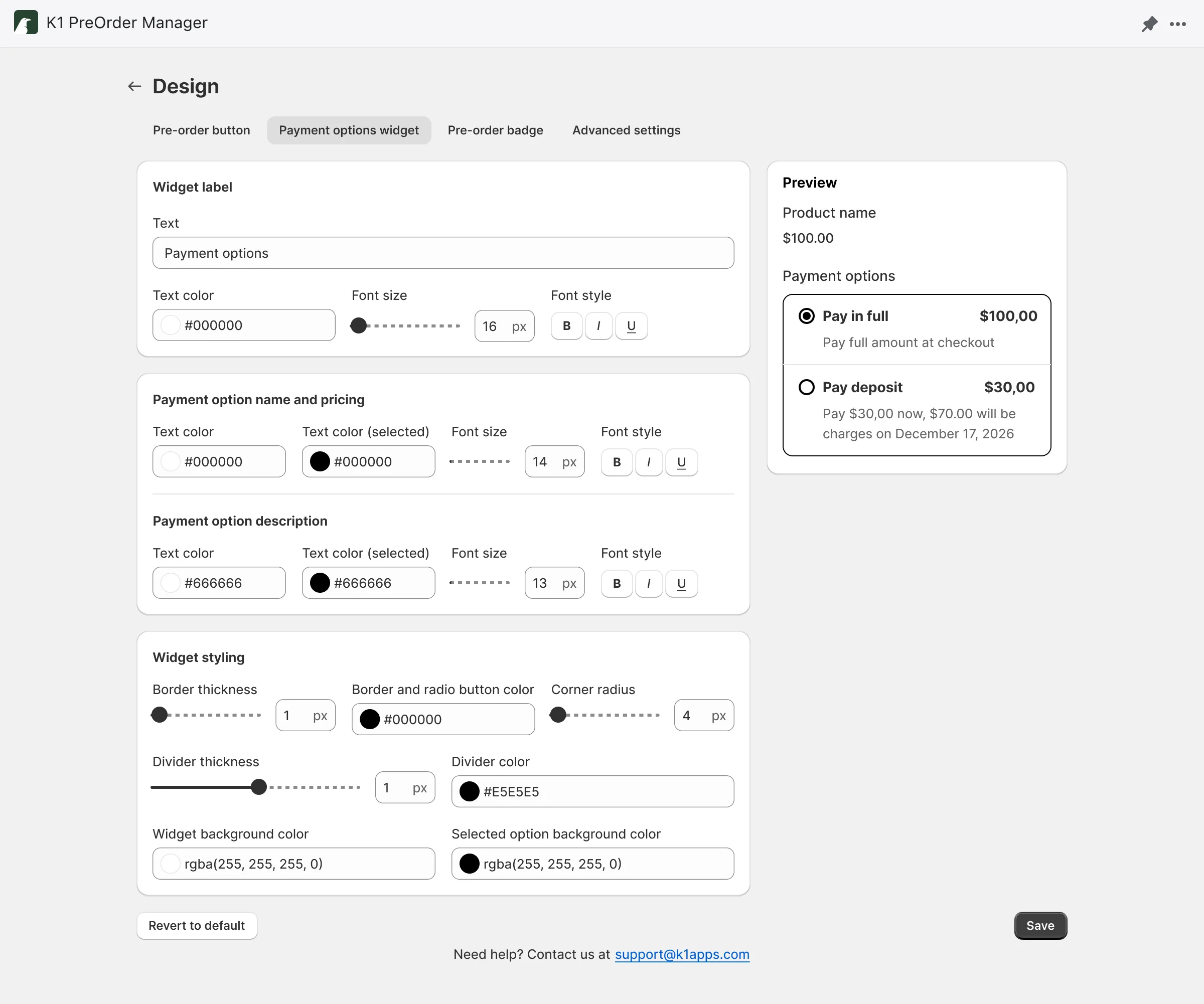
- Customize display order of payment options to highlight your preferred choice
- Set default selection for which payment option is pre-selected on product pages
- Create custom labels for each payment option to communicate value (e.g., "Secure with Deposit", "Pay in Full—Save 5%")
- Dynamic messaging per payment option using variables to show exact amounts and dates
- Visibility controls to show or hide specific payment options based on campaign strategy
Native App Block Integration – Code-free widget placement
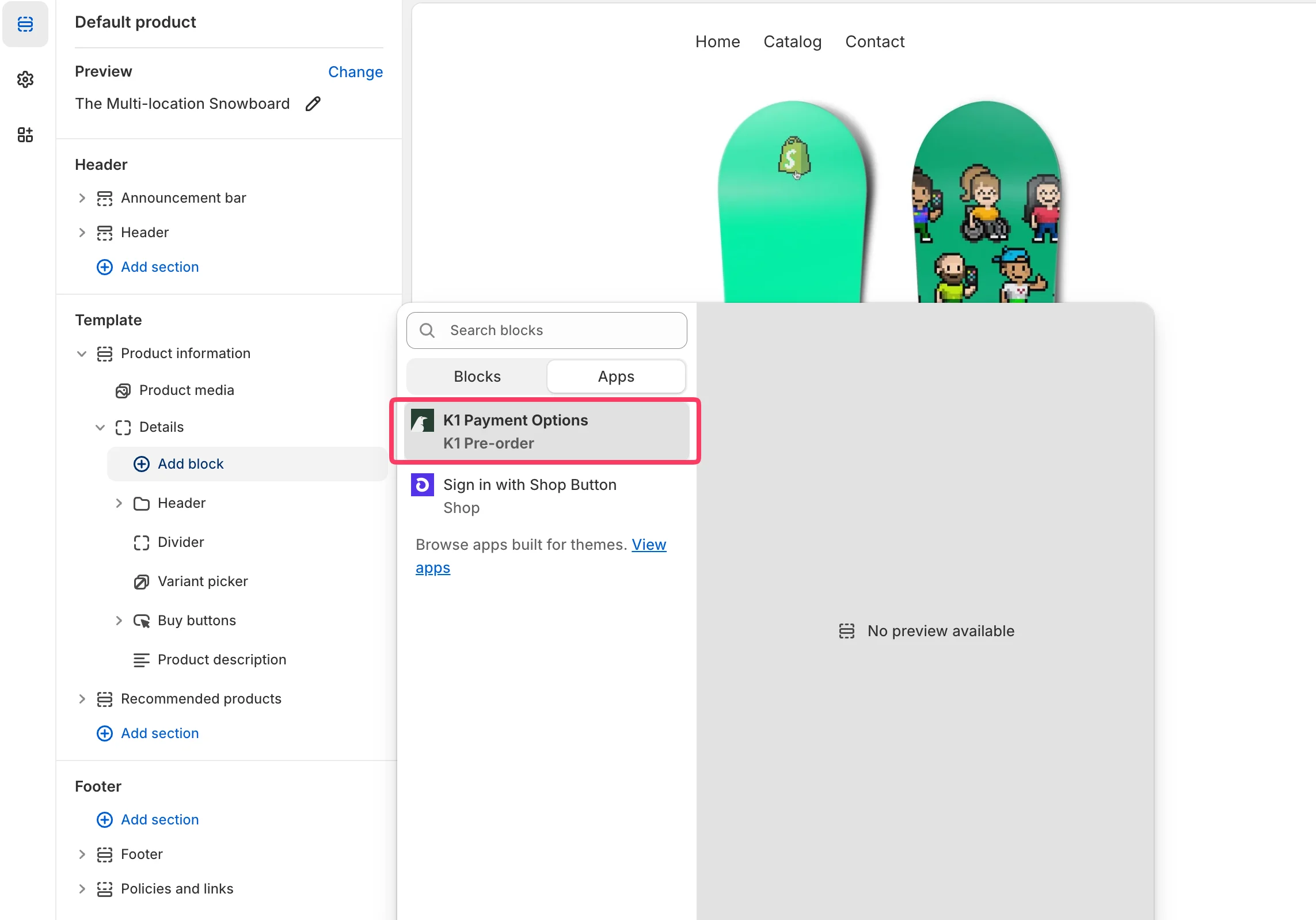
- Add pre-order widgets directly from the Shopify theme editor without touching code
- Drag-and-drop positioning for exact placement on product pages
- Universal compatibility with any Shopify theme supporting App Blocks (OS 2.0+)
- Embedded widget option remains fully supported for existing implementations
Redesigned Homepage Experience – Faster setup and better navigation
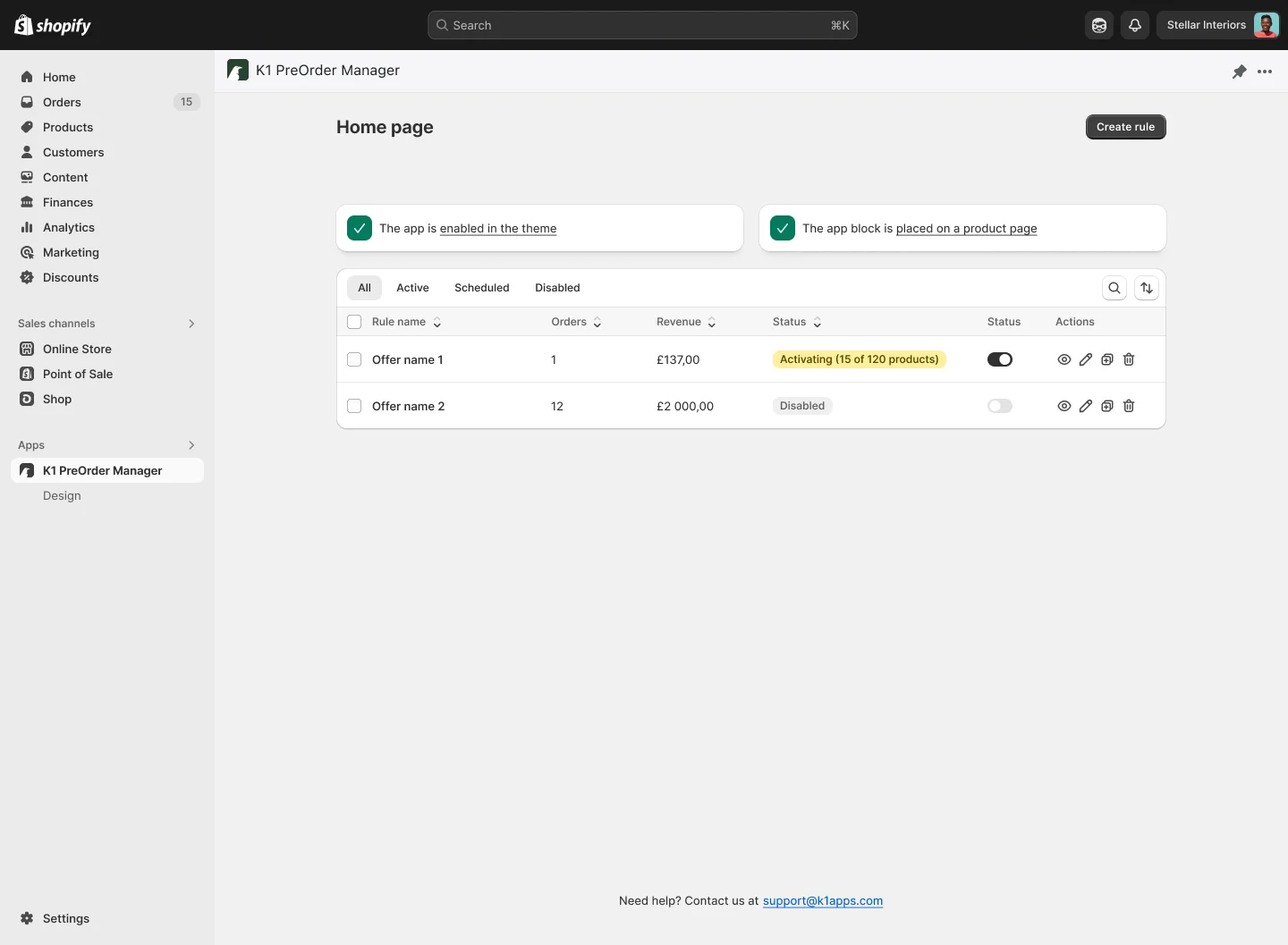
- Cleaner onboarding flow for new users setting up their first pre-order rule
- Improved navigation and faster access to payment option configurations
- Enhanced rule management interface for stores running multiple pre-order campaigns
🛠 Improvements
Settings Reorganization – Enhanced flexibility and control
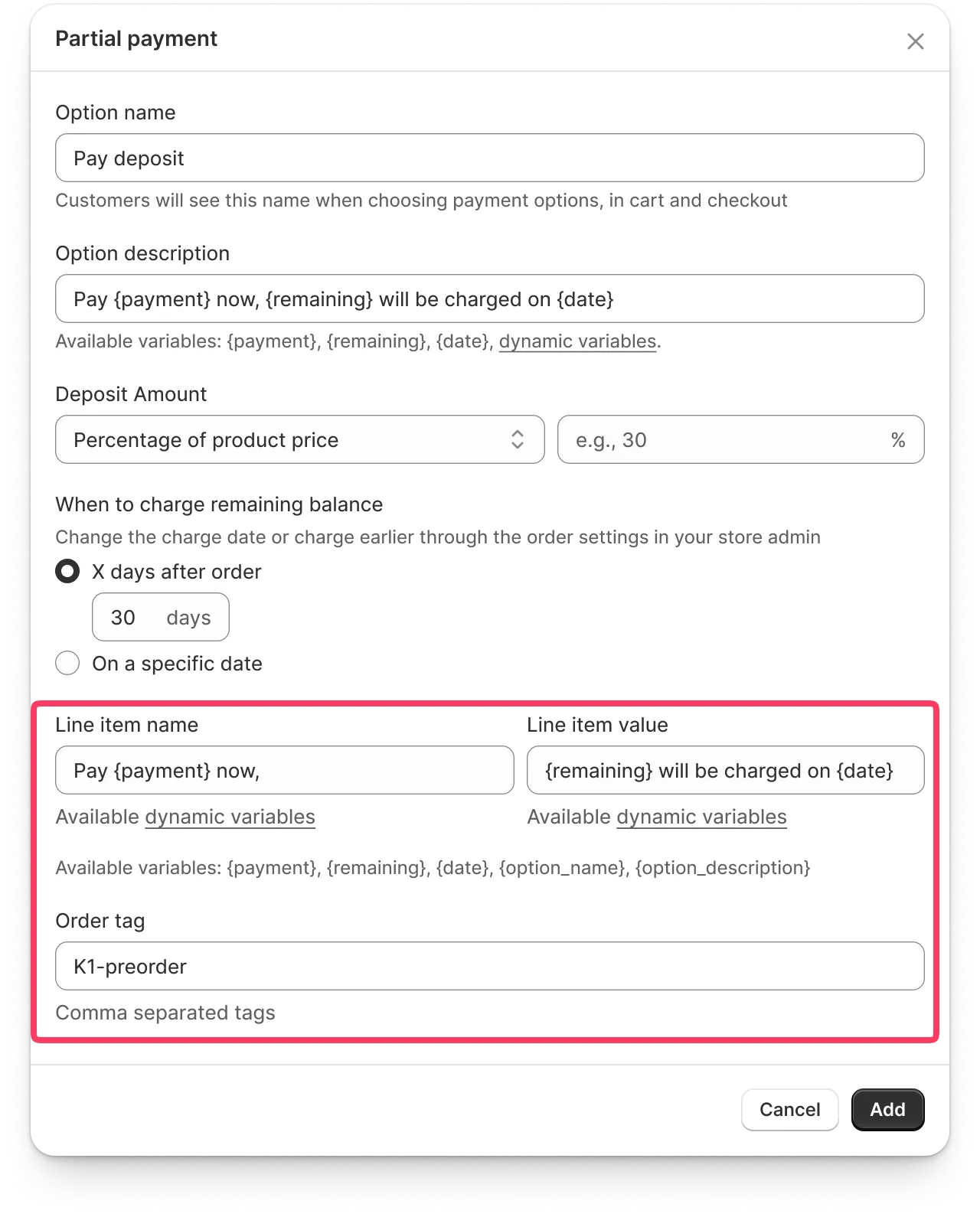
- Order Tag and Inline Item settings moved from rule level to Payment Options section
- Payment-specific workflows and automations now possible
Performance Enhancements – Built for high-volume stores
- Advanced caching layer ensures faster page loads and widget rendering for large catalogs
- Database optimization with improved query performance and indexing strategies
- Enhanced high-load handling for reliable performance during product launches and traffic spikes
- Faster storefront experience keeps customers engaged during checkout
- Smoother admin interface when managing hundreds or thousands of pre-order rules
Version 1.12 –
🛠 Improvements
Product Data Retrieval – Optimized API requests and reduced server load
- Enhanced product link verification before data retrieval significantly reduces unnecessary API requests to Shopify
- Improved validation ensures the app receives accurate product data on the first request, eliminating retry cycles caused by incorrect links
- Lower server load and faster response times across all stores, especially during catalog updates and rule activation
Order Tagging Reliability – Enhanced Shopify API communication for stable tag assignment
- Improved API communication logic ensures order tags are applied correctly even during Shopify platform high-load periods
- More reliable order and product status retrieval prevents tagging errors caused by delayed or incomplete API responses
- Consistent tag assignment for pre-order tracking and fulfillment workflows
Theme Compatibility – Minor storefront display improvements
- Enhanced compatibility and display stability across various themes
- Improved visual consistency for pre-order elements on storefront pages
Version 1.11 –
🛠 Improvements
Inventory Data Reliability - Enhanced synchronization with Shopify inventory system
- Significant system improvement for inventory handling ensures stable and accurate inventory data retrieval from Shopify
- The app now proactively verifies exact inventory values before order placement, eliminating issues caused by delayed inventory updates from Shopify API
- Enhanced stability prevents pre-order overselling and ensures accurate stock availability across your storefront
Interface Loading Optimization - Faster app performance
- Optimized interface loading times deliver faster page rendering and improved responsiveness throughout the app
- Enhanced user experience when managing rules, viewing analytics, and navigating between app sections
Version 1.10 –
🛠 Improvements
Pre-Order Identification - Improved order tagging reliability
- Enhanced pre-order identification system ensures all orders placed through pre-order rules receive the correct order tags automatically
- Resolved issues where some pre-order transactions were not properly tagged in the order list, improving order tracking and fulfillment workflows
- More reliable order segmentation for reporting and automation based on pre-order tags
Application Performance - Enhanced stability under high traffic
- Improved application performance during peak traffic periods and high-load scenarios
- Better resource management ensures consistent response times even when processing large volumes of concurrent requests
- Enhanced reliability during sales events and promotional periods
Version 1.9 –
🚀 New Features
Email Notifications - Track your pre-order operations and app activity
- Get alerts when you're approaching your pre-order usage limits so you can upgrade before hitting caps
- Stay informed about your pre-order activity without constantly checking the dashboard
Custom Theme Detection - Automatic compatibility warnings and guidance
- The app now automatically detects when you're using a custom or unsupported theme
- Receive clear warnings about potential display risks before activating pre-order rules
- Proactive notifications help you avoid storefront display issues before customers see them
🛠 Improvements
Storefront Filter & Sort Compatibility - Pre-order badges persist through product filtering
- Pre-order badges now remain visible when customers use filters and sorting on collection and search pages
- Enhanced storefront experience ensures pre-order information stays visible regardless of how customers browse your catalog
Translation Character Limits Removed - Unlimited message length
- Character restrictions removed from Inline Item and Pre-Order Message translations for better multilingual support
Theme Compatibility - Reformation theme support added
- Full support for the Reformation theme ensures pre-order content displays correctly across all storefront pages
🐞 Fixes
- Complex collection counting: Resolved an issue where products in complex collections (with multiple filters or conditions) were counted incorrectly, ensuring accurate product counts and reliable rule scope
Version 1.8 –
🛠 Improvements
Collection Product Count – See collection size when adding to rules
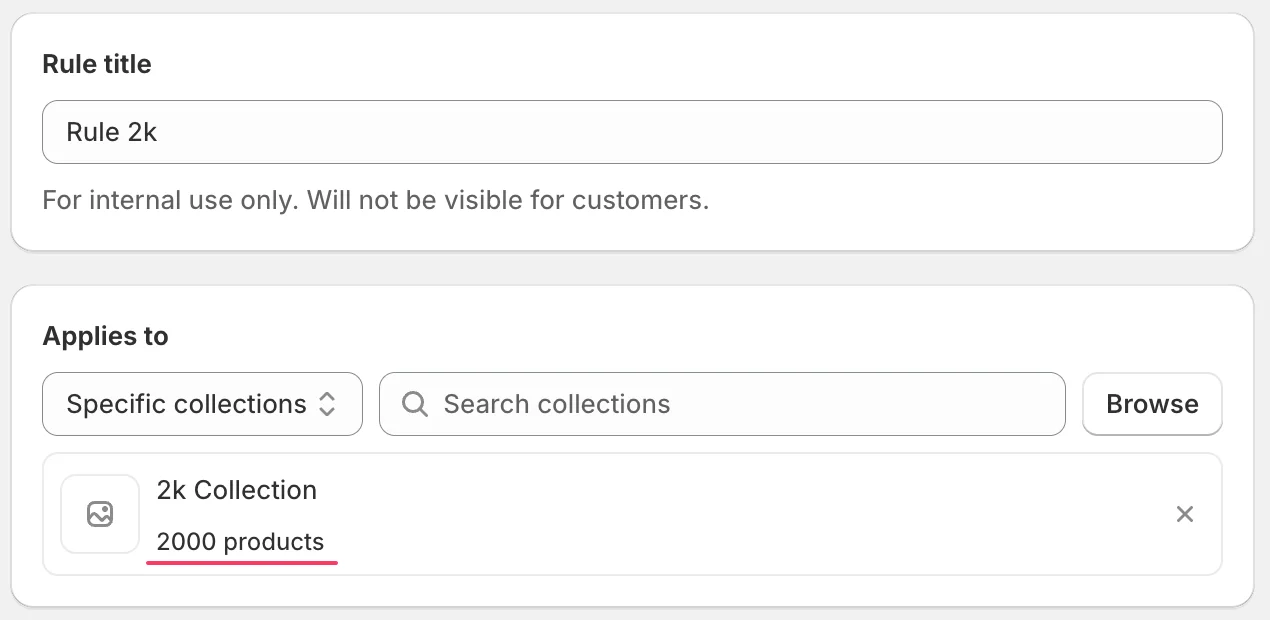
- View the number of products in each collection directly when adding it to a rule, helping you understand rule scope before applying it
- Make informed decisions about which collections to include without manually checking product counts in Shopify
Metafield Performance – Faster storefront display with background processing
- Metafield updates in rules now process in the background, significantly improving how quickly dynamic metafield values appear on your storefront
- Enhanced overall app performance ensures pre-order content displays instantly without slowing down your store
Large Collection Support – Full smart collection and high-volume collection handling
- Rules now fully support smart collections and regular collections with 10,000-20,000+ products without performance degradation
- Automatic dynamic synchronization keeps product states accurate in real-time, even for high-traffic stores with massive catalogs
- Reliable rule activation and state management for large collections ensures pre-orders apply correctly across your entire inventory
🐞 Fixes
- Rule preview: Fixed an issue where rule preview remained accessible when the app embed was disabled; preview is now correctly disabled when the app is not active in your theme
- Badge and ribbon display: Resolved minor display issues with badges and ribbons to ensure consistent visual presentation across all storefront pages
Version 1.7 –
🚀 New Features
Dynamic Metafield Variables – Insert product-specific information automatically
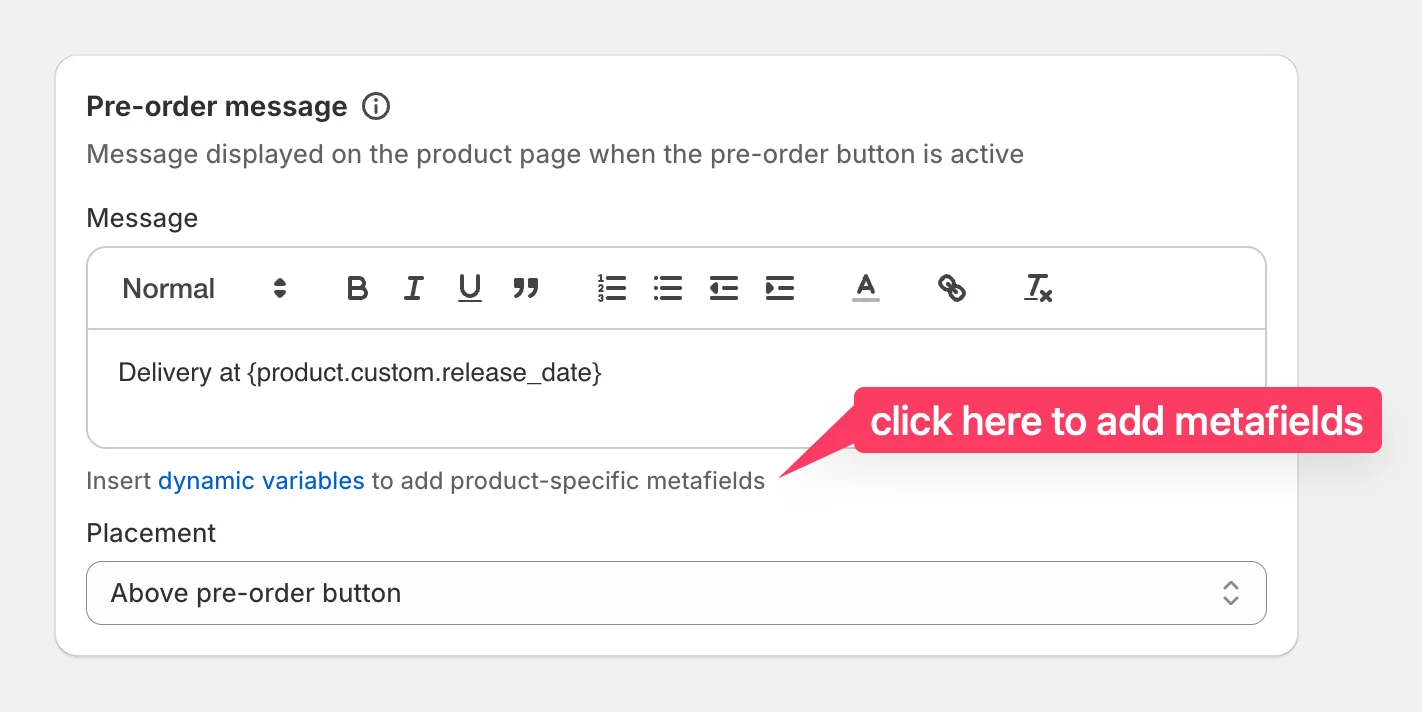
- Create metafields in Shopify (like delivery dates, materials, or dimensions) and reference them directly in your pre-order messages and inline item text
- Metafield values automatically display for each product without manual updates or creating separate rules
- No more maintaining hundreds of individual rules or constantly changing dates in messages when product information updates
- Simply reference a metafield once (e.g., {product.custom.delivery_date}), and the correct value appears dynamically for every product
- Full multilingual support ensures metafield values adapt to your storefront language – dates automatically format according to the selected language (e.g., "June 15, 2025" in English, "15. Juni 2025" in German)
Version 1.6 –
🛠 Improvements
Performance Optimization – Enhanced backend processing for high-traffic periods
- Product and collection updates are now processed through an optimized queue system, significantly improving app performance during catalog changes
- Faster storefront display times during high-load periods ensure pre-order buttons and badges appear instantly even when multiple stores experience peak traffic simultaneously
- Reliable performance during Black Friday, Cyber Monday, and other high-traffic sales events means your pre-orders display correctly when it matters most
Theme Compatibility – Full integration with Motion and ARCHΞTYPE themes
- Complete support for Motion and ARCHΞTYPE themes ensures pre-order buttons, badges, and messaging display correctly across all storefront pages
- No manual configuration needed – the app automatically adapts to these themes' unique structure and styling
🐞 Fixes
- Large collection handling: Resolved an issue preventing collections with more than 250 products from being added to pre-order rules correctly due to Shopify API credit limits – rules now process large collections reliably
Version 1.5 –
🚀 New Features
Multilingual Translation – Translate pre-order content into any language your store supports
- Manually translate all customer-facing elements (button text, badge text, cart labels, and rule-specific messages) into any language published in your Shopify store
- Reference default language text as you translate to maintain consistency with your original messaging
- Translations automatically fall back to your default language when missing, ensuring customers always see complete pre-order information
- Manage all translations from a centralized interface with clear status indicators showing which languages are fully translated
- HTML formatting support in rule messages allows you to maintain bold, italic, and other text styling across languages
Version 1.4 –
🛠 Improvements
Enhanced Rules Management Interface – Streamlined rule actions and status controls
- Perform common actions (preview, edit, duplicate, delete) directly from the rules list without navigating to individual pages
- Quickly enable or disable rules using a toggle switch for rapid testing and bulk management
- Preview rules directly from the edit page to test configurations before publishing
Theme Activation Guidance – Clear alerts when app embed is disabled
- Receive warnings when the app embed is disabled so you understand why rules aren't displaying on your storefront
- Visual step-by-step guide for enabling the app in your theme
- Automatic prompt to enable the app embed when creating your first rule
Version 1.3 –
🚀 New Features
Continue Selling When Out of Stock – Automatic inventory control for pre-orders
- Automatically manage Shopify's "Continue selling when out of stock" setting for products in your pre-order rules
- Choose to enable the setting automatically when rules activate, or keep your current inventory settings unchanged
- Rules with 50+ products show live progress during activation and deactivation
- System restores original inventory settings when rules end, or optionally forces them off
- Smart queue management processes multiple rule changes sequentially to ensure reliability
🐞 Fixes
- Scheduled rule activation: Fixed an issue preventing manual activation of scheduled rules
- Automatic reactivation: Rules now automatically reactivate when conflicts are cleared, enabling pre-orders for previously conflicting products
- Conflict messages: Improved clarity of conflict notifications throughout the app
Version 1.2 –
🐞 Fixes
- Scheduling checks: Disabling a rule no longer triggers start date validation. Start‑date validation now runs only on Activate/Reactivate, resolving cases where an active, previously scheduled rule could not be disabled due to an erroneous validation message.
- Conflicts CSV: Resolved a problem that prevented the conflicts CSV from displaying/downloading correctly; the file now opens with proper headers and complete rows.
- Variant rendering after product rename: Fixed a bug where pre‑order display failed for certain variants if the product name was changed outside the app; variant‑level rendering now remains stable after product title updates.
Version 1.1 –
🚀 New Features
Order Tagging – Customizable Order Tags for Pre‑orders
- Automatically apply merchant‑defined tags (one or multiple, comma‑separated) to orders containing pre‑order items from this rule
- Tags from multiple rules are merged without duplicates, enabling Shopify views, filters, and automations for fulfillment and reporting
Inline Cart – Customizable Inline Item Note
- Display a clear, editable note right under each pre‑order line in Cart and Checkout so customers know what’s a pre‑order and when to expect it
- Supports dynamic variables such as {pre-order_message} to insert product‑specific messages without manual duplication
- To hide the inline note, disable Show inline item or save an empty message; no inline text will be displayed
🛠 Improvements
- Design: new font size control for the Pre‑order button/badge — improve readability and match your brand
- Rules list: faster search by product & SKU to find and manage rules quickly in large catalogs